

State: Product Activated


Official Version
Official version provided by the developers. Licensed under the GNU GPL, allowing use on an unlimited number of sites.
Technical Support
Professional assistance with any technical issues. Support is included in the price. Read our Support Policy.
Guarantees and Safety
100% safe and fully functional product. Completely risk‑free. 14‑day money‑back guarantee. Read our Refund Policy.
I use Yoast Video SEO when a site has videos that actually matter for search visibility, not just a few decorative embeds dropped into blog posts. It is a premium Yoast extension built to improve how WordPress handles video metadata, video schema, and video XML sitemap output, so search engines have a better chance of understanding that a page contains indexable video content.
This plugin makes the most sense on sites like:
If the site only has an occasional YouTube embed, I usually would not call this essential. But if video discovery matters, it is one of the cleaner WordPress-native options.
Yoast Video SEO is not a video player plugin. It does not host, edit, or style videos. Its job is to help WordPress output better SEO signals around video content.
In practice, it usually adds or improves:
It works best when paired with the main Yoast SEO plugin, because it is really an extension of that ecosystem rather than a standalone SEO platform.
The plugin scans content looking for video embeds or video references on posts, pages, and supported post types. Depending on how the video is inserted, it may detect:
When detection works properly, the plugin can help generate:
That improves the odds that search engines correctly interpret the page as a video page rather than just a normal article with an iframe somewhere in the middle.
The important limitation is this: the plugin can only work with what it can detect. If the video is injected late by JavaScript, hidden behind custom tabs, loaded only after interaction, or rendered in an unusual builder/widget structure, detection can become unreliable.
Like most Yoast products, Yoast Video SEO is a mix of:
In practical terms:
That means if you change the page builder layout, video source, or embed method, you may affect whether Yoast Video SEO can still see the video correctly.
The most common issue is video detection failure. The page visibly contains a video, but the plugin does not include it in sitemap/schema output. That usually happens because:
My first test is simple:
If the video only appears after JS interaction, search-related plugins often miss it.
The second common issue is conflict with page builders or custom fields. Some sites store video URLs in meta fields and render them later through templates. That looks fine visually, but the plugin may not automatically recognize the final output as video content. On those sites, I verify:
If the video exists only as a custom field value and never becomes standard front-end markup early enough, indexing signals may be incomplete.
Another real-world problem is duplicate or conflicting schema. If the site also runs:
you can end up with messy structured data output. That does not always break the page, but it can create inconsistent signals. I usually pick one main schema authority and reduce overlap.
A lot of support complaints are really sitemap issues, not video issues. If the video sitemap or related entries are missing, I check:
If the containing page is set to noindex, or the page is blocked from normal indexing, the video SEO enhancements will not magically override that.
On performance-optimized sites, I also watch for:
Yoast Video SEO can usually be installed manually without connecting a valid license immediately, but that does not mean you have the full licensed product experience. Without proper activation, you typically lose:
The plugin may still function if manually installed, but for a premium SEO extension, running it without updates is not something I consider a good long-term setup.
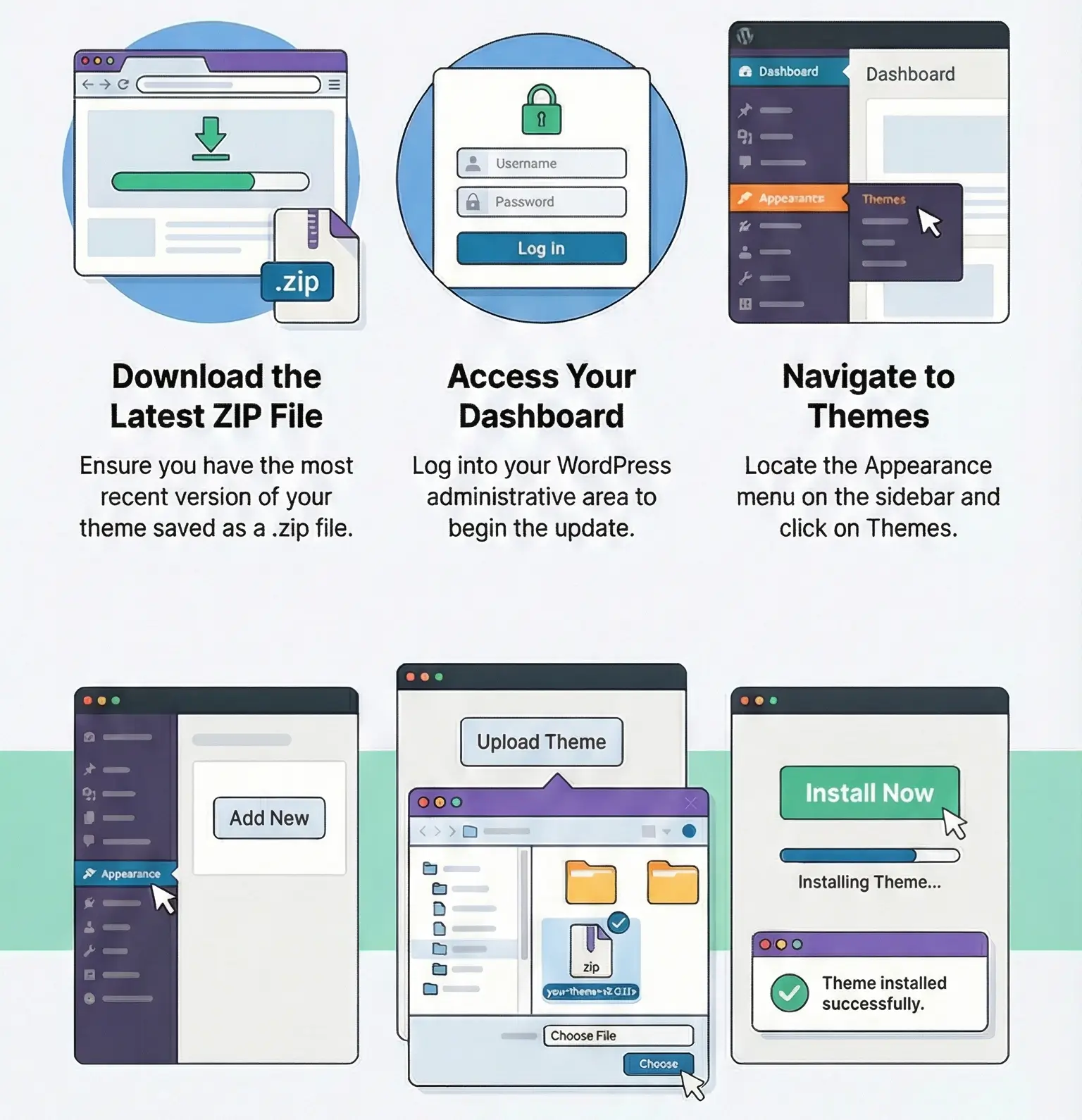
Manual updates are usually done by:
As always, any edits made directly inside the plugin files will be overwritten during update. I would never customize this plugin by editing its core files.
I would use Yoast Video SEO when:
I would be more cautious when:
After setup, I usually verify:
Download Yoast Video SEO archive with the latest update and install it over the existing version. If there is no previous version installed, the plugin can be installed using the standard method. You can find detailed instructions on how to update a theme or plugin on this page.
All products we provide come only from official sources and verified developers. To confirm their integrity and safety, the archive has been scanned for viruses and malware. You can review the scan results at any time by clicking the button on the right. This gives you an extra level of confidence before downloading and using the files.
No. It is an extension focused on video SEO. It works best as part of the Yoast ecosystem, typically alongside the main Yoast SEO plugin.
No. It does not replace a video player or media plugin. Its job is sitemap/schema/metadata support for video content.
Usually because the video is injected too late by JavaScript, rendered in an unusual builder structure, or rewritten by lazy-load/optimization tools.
Usually yes, with standard embed methods. Problems are more common when the embed is heavily customized or dynamically rendered.
Most often because the video was not detected, the page is noindexed, the sitemap is cached incorrectly, or another SEO/schema system is interfering.
Only if video SEO is important. Yoast SEO Premium handles general SEO tasks, but Video SEO is the specialized add-on for video-specific sitemap/schema support.
You can use any product from our store on as many websites as you like.
After purchasing a product, you’ll be able to download it — including the most recent version — for the next 72 hours. Once that period ends, you can either repurchase the product or switch to one of our membership plans.
With an active membership, updates are always included. You’ll have continuous access to the latest versions for as long as your membership remains active, without worrying about expiration dates.
Yes, we do. In most cases, you can expect a reply within 24–72 business hours. For simpler issues, we’re often able to respond much sooner.
You can contact us via live chat or open a support ticket directly from the product page — whichever is more convenient for you.
No, there are no limits. We don’t believe in restricting downloads. If you need to download a product multiple times, that’s absolutely fine.
We use professional, high‑performance storage systems to ensure downloads are fast, stable, and hassle‑free.
No, license keys are not included. In the past, license sharing and related issues caused account problems, so we decided to stop distributing keys.
That said, all products you receive are fully authentic. For items that normally require activation, we provide them pre‑activated, allowing you to install and use them immediately without dealing with license input or activation errors.
Yes — 100%. All products are original and distributed under the GNU GPL v2/v3 license.
The main difference compared to purchasing directly from the original author is that we don’t offer additional services such as custom development or one‑on‑one support. License keys are also not included. Instead, products that typically require activation are delivered ready to use, allowing installation on unlimited websites.
Yes, we stand behind our products. If you encounter an issue that cannot be resolved or a technical problem without a workable solution, we’ll do our best to help — and if necessary, issue a full refund.
Please note that refunds are not available if the product works as described but simply does not meet personal expectations. We’ve also encountered cases where refund requests were made while the product was still in use, which we cannot allow.
Our approach is simple: fairness and transparency. If you ever have a concern, just reach out — we’re always open to finding a reasonable solution that works for both sides.




Reviews
There are no reviews yet.