

State: Product Activated

Official Version
Official version provided by the developers. Licensed under the GNU GPL, allowing use on an unlimited number of sites.
Technical Support
Professional assistance with any technical issues. Support is included in the price. Read our Support Policy.
Guarantees and Safety
100% safe and fully functional product. Completely risk‑free. 14‑day money‑back guarantee. Read our Refund Policy.
WP Schema Pro is the kind of plugin people install hoping for “better SEO,” but its real job is much narrower and more important: it turns WordPress content into structured data that search engines can parse predictably. Used properly, it reduces manual schema markup work and helps standardize how posts, pages, products, reviews, businesses, breadcrumbs, and other entities are described in JSON-LD.
That matters because most sites do not fail at SEO due to a lack of plugins. They fail because their structured data is inconsistent, duplicated, invalid, or overly optimistic. Schema Pro is useful when the goal is not to “hack rich results,” but to map real site content into clean schema output without manually writing and maintaining JSON-LD across templates.
At the implementation level, Schema Pro typically generates structured data as JSON-LD in the page output, usually in the frontend head or body depending on theme/plugin behavior. It does this by letting the admin create schema types and map required fields to WordPress data sources such as:
The plugin is essentially a schema mapping engine. It does not “improve rankings” by itself. It creates machine-readable entities based on content relationships and field mapping rules.
In practical database terms, the plugin stores schema configuration in WordPress options and/or post meta depending on the schema type and per-post overrides. The live schema markup is then rendered dynamically when matching content is viewed.
That means two things:
The most common problem is duplicate schema, not missing schema.
A real example: a site uses an SEO plugin that already outputs Article, Product, Breadcrumb, or Organization schema, then Schema Pro adds another layer for the same entity. The page ends up with two competing versions of structured data. Search engines do not reward that. At best they ignore one; at worst they flag the page as inconsistent.
So when evaluating Schema Pro on a live site, the first thing I check is not whether markup exists, but whether it exists more than once.
What I look for:
The correct workflow is to choose which system owns which schema type. If Schema Pro is going to handle Articles or Products, reduce or disable overlapping output elsewhere where possible.
The second common issue is invalid field mapping. The plugin can only output what it is given. If an admin maps a required field to an empty custom field, or uses a generic text field where a valid URL/image/rating value is expected, the schema may technically render but fail validation or become meaningless.
Typical failures include:
This is why I do not trust the presence of JSON-LD alone. I validate the actual page output with a structured data testing workflow and inspect the rendered JSON-LD directly.
The third issue is conditional coverage mistakes. Admins often think they have applied schema sitewide, but the rules only target certain post types, categories, or templates. The markup looks fine on one sample URL and missing on the rest.
So I test several URLs:
Schema Pro is usually lighter than visual builder plugins because it mostly outputs JSON-LD rather than complex interactive UI. So performance problems are rarely the main complaint.
Still, conflicts can happen through:
If a schema setting is changed and the frontend output does not reflect it, I clear:
And if the admin interface behaves strangely after update, I check for plugin conflicts in the WordPress admin, especially with other SEO or metadata-related plugins.
Schema plugins are deceptively sensitive because they sit on top of content ownership. On a modern WordPress site, multiple systems may believe they are responsible for structured data:
That’s why Schema Pro works best when it is given a clearly defined role. For example:
What usually fails is not the plugin itself, but unclear ownership.
All products we provide come only from official sources and verified developers. To confirm their integrity and safety, the archive has been scanned for viruses and malware. You can review the scan results at any time by clicking the button below.
View in VirusTotalOn my side, this plugin is activated, working, and checked in a live WordPress context. In normal use, official activation typically governs update delivery and support access more than core execution.
Without official license linkage, you generally lose:
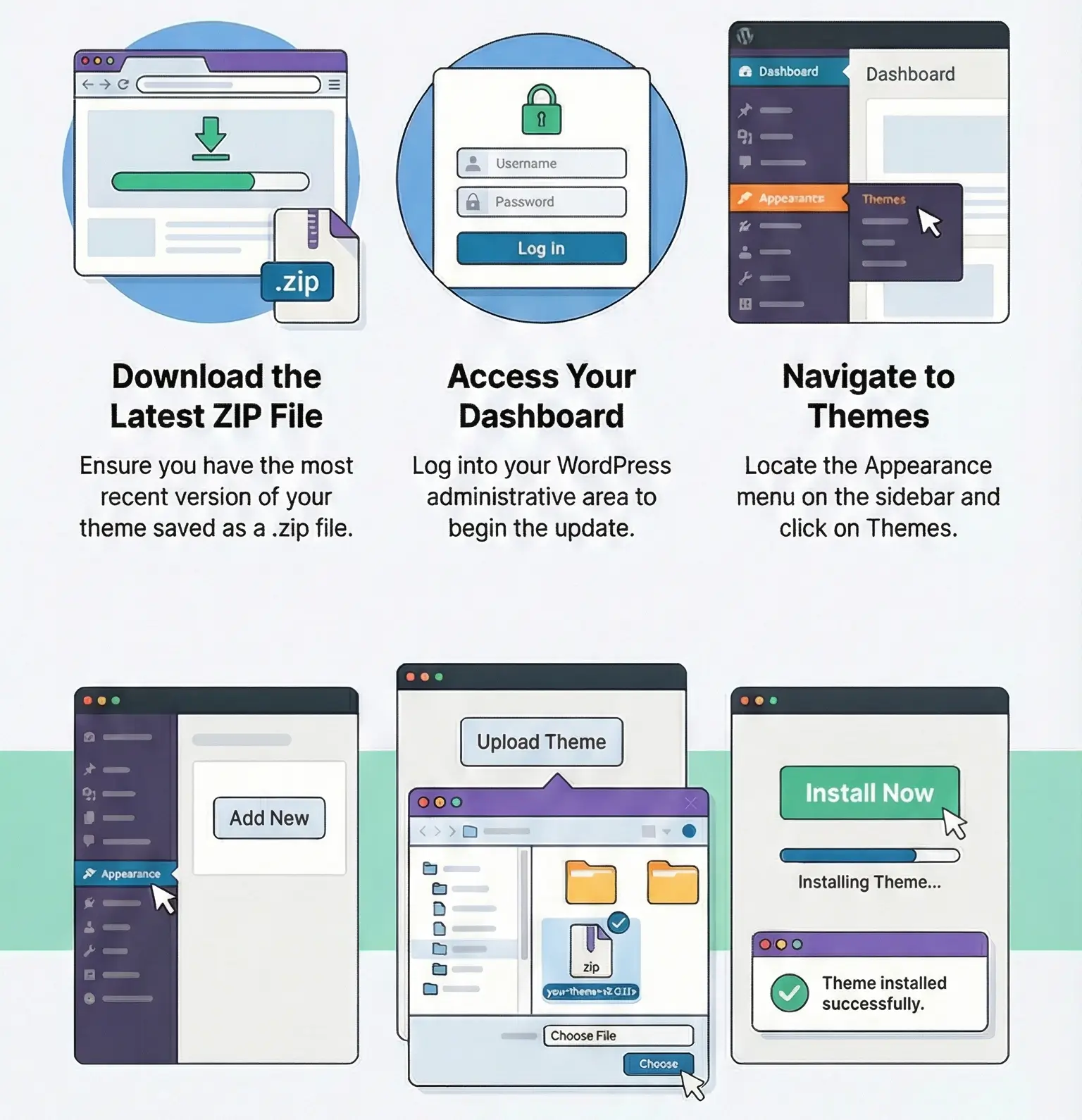
Manual updates can be done through the WordPress uploader or FTP replacement. After updating, I verify two things:
This matters because a plugin can update “successfully” while silently changing field behavior, schema type logic, or compatibility with another SEO component.
So the real post-update test is:
No. It helps generate structured data, which may improve how search engines understand content and may support eligibility for rich results, but it is not a direct ranking guarantee.
Duplicate schema output. If another SEO, theme, or commerce plugin already prints the same schema type, you can end up with conflicting markup.
Because valid schema is only one requirement. Search engines decide independently whether to show rich results, and the content itself must meet quality and policy expectations.
Normally settings should remain stored in WordPress. The bigger risk is changed compatibility, broken field mappings, or duplicate output after update—so always validate key pages afterward.
You can use any product from our store on as many websites as you like.
After purchasing a product, you’ll be able to download it — including the most recent version — for the next 72 hours. Once that period ends, you can either repurchase the product or switch to one of our membership plans.
With an active membership, updates are always included. You’ll have continuous access to the latest versions for as long as your membership remains active, without worrying about expiration dates.
Yes, we do. In most cases, you can expect a reply within 24–72 business hours. For simpler issues, we’re often able to respond much sooner.
You can contact us via live chat or open a support ticket directly from the product page — whichever is more convenient for you.
No, there are no limits. We don’t believe in restricting downloads. If you need to download a product multiple times, that’s absolutely fine.
We use professional, high‑performance storage systems to ensure downloads are fast, stable, and hassle‑free.
No, license keys are not included. In the past, license sharing and related issues caused account problems, so we decided to stop distributing keys.
That said, all products you receive are fully authentic. For items that normally require activation, we provide them pre‑activated, allowing you to install and use them immediately without dealing with license input or activation errors.
Yes — 100%. All products are original and distributed under the GNU GPL v2/v3 license.
The main difference compared to purchasing directly from the original author is that we don’t offer additional services such as custom development or one‑on‑one support. License keys are also not included. Instead, products that typically require activation are delivered ready to use, allowing installation on unlimited websites.
Yes, we stand behind our products. If you encounter an issue that cannot be resolved or a technical problem without a workable solution, we’ll do our best to help — and if necessary, issue a full refund.
Please note that refunds are not available if the product works as described but simply does not meet personal expectations. We’ve also encountered cases where refund requests were made while the product was still in use, which we cannot allow.
Our approach is simple: fairness and transparency. If you ever have a concern, just reach out — we’re always open to finding a reasonable solution that works for both sides.







Reviews
There are no reviews yet.