

State: Product Activated


Official Version
Official version provided by the developers. Licensed under the GNU GPL, allowing use on an unlimited number of sites.
Technical Support
Professional assistance with any technical issues. Support is included in the price. Read our Support Policy.
Guarantees and Safety
100% safe and fully functional product. Completely risk‑free. 14‑day money‑back guarantee. Read our Refund Policy.
I use JetSmartFilters when a site needs real front-end filtering, not just a search box with hope attached. It fits best on projects built around JetEngine listings, custom post types, WooCommerce product grids, and directory-style archives where users need to narrow results by taxonomy, meta fields, price, date, checkboxes, or range sliders without full page reloads.
What I like about it is that the plugin is not inventing its own content layer. It sits on top of an existing query provider — usually a Listing Grid, Products Grid, or archive — and changes that query through AJAX. When it works, it feels clean. When it fails, the failure is almost always in the wiring: the filter is talking to the wrong provider, the query IDs don’t match, or the page cache is serving stale results.
JetSmartFilters stores filters as their own editable items in the WordPress admin. In practice, the filter definitions live in the database, and you configure them from the plugin’s filter screens plus the widget/block settings where you place them. The actual page layout is usually built in Elementor, Gutenberg, or another supported builder, while the filter logic is attached to a specific listing/archive/provider on that page.
That separation matters:
If I need to change labels, placeholders, options source, hierarchy, or whether a filter is AJAX/applied on change, I do it in the filter settings and widget settings. If I need to change the actual result markup, that is not a JetSmartFilters job — I edit the listing item template, archive template, or product grid instead.
On the front end, the plugin enqueues its own JS/CSS plus dependency scripts for things like:
jet-smart-filtersselect2When filtering stops working, I open DevTools → Network and Console immediately. I’m looking for:
If the filter UI loads but the grid never changes, that usually means provider mismatch, not styling.
The most common problem is simple: the filter is attached to the wrong thing. The filter widget may be set for one provider, while the grid uses another, or the listing and the filter use different Query ID values. That produces the classic symptom: the filter changes state, but nothing on the page updates. The fastest fix is to check both sides:
If those don’t match exactly, AJAX filtering will look alive and still do nothing.
The second common break is filters showing the wrong values or empty results because the data source doesn’t match the actual field storage. I see this a lot with custom fields. A checkbox filter built from a meta field will fail if the field stores serialized arrays, different value keys than the labels suggest, or values in a format the filter is not querying correctly. The fix is not cosmetic — I check how the field is actually saved in the database and then point the filter to the correct source/value format. If it’s a taxonomy, I use a taxonomy filter. If it’s post meta, I make sure the stored value matches what the filter expects.
The third break is optimization or cache interfering with AJAX. Delay-all-JS settings often break the init sequence, especially on pages with Listing Grid widgets, hidden tabs, or popups. My first exclusions are:
jet-smart-filtersjet-enginejquery-coreselect2If the result counts or filtered grids stay stale, I also stop page cache/CDN from caching filtered requests or pages with active query strings. A filter can be technically working while the cache keeps returning an old HTML fragment.
One more real issue: filters inside hidden tabs, accordions, or popups. Range sliders and select controls often initialize before the container is visible, so widths/heights calculate wrong and the UI looks broken or unresponsive. The quickest fix is to initialize them only after the tab/popup is opened, or move the filter outside the hidden container if the builder setup allows it.
All products we provide come only from official sources and verified developers. To confirm their integrity and safety, the archive has been scanned for viruses and malware. You can review the scan results at any time by clicking the button below.
View in VirusTotalJetSmartFilters can usually be installed and run manually without connecting a license key, but the key is what gives you the normal product workflow. Without activation, the plugin may still function, but you typically lose:
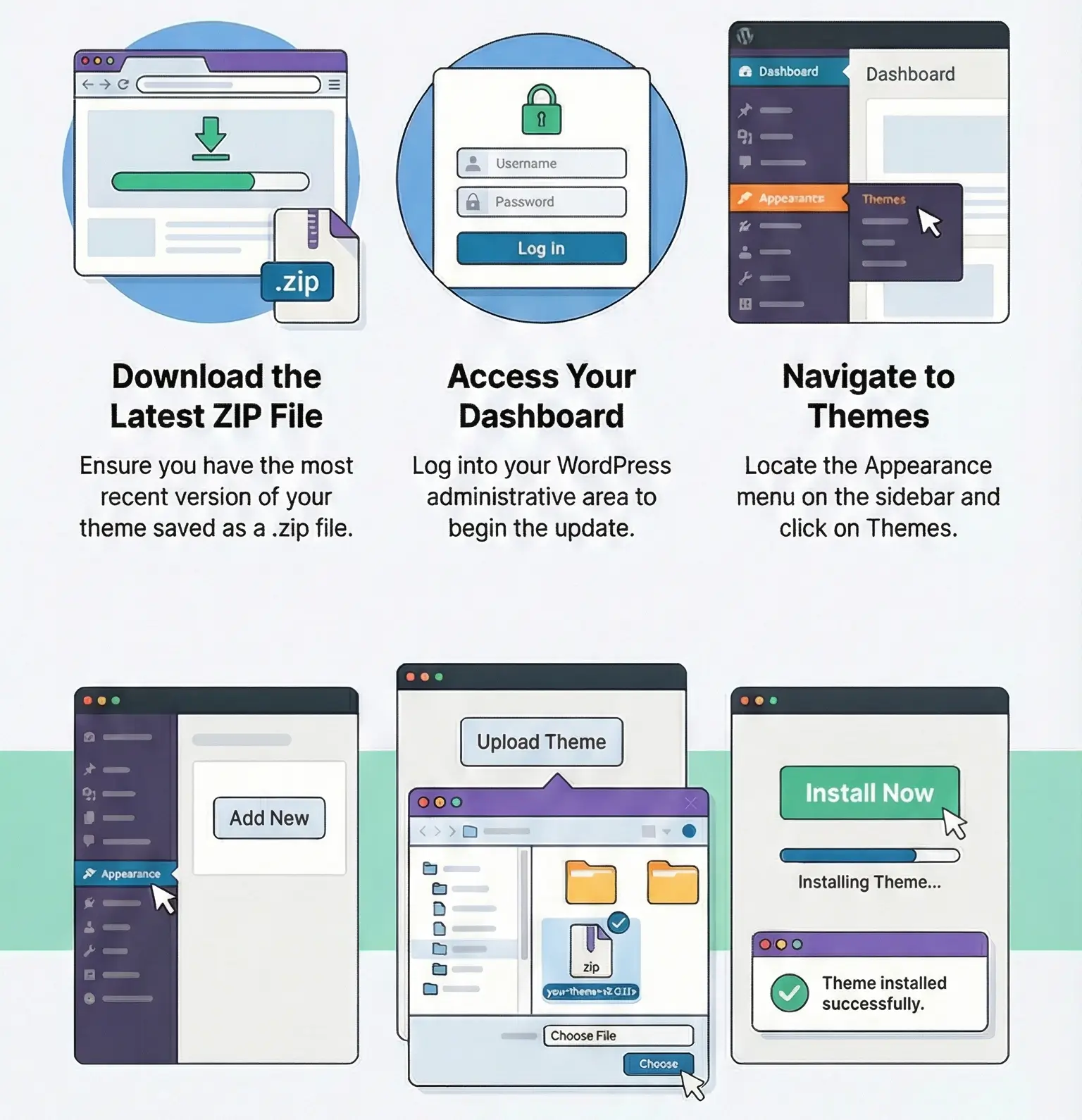
Manual updates are straightforward: upload the new plugin ZIP in Plugins → Add New → Upload Plugin, or replace the plugin via FTP/SFTP. Since this is a plugin, direct edits to plugin files will be overwritten on update. I don’t customize JetSmartFilters inside the plugin folder; if I need custom logic, I keep it in theme/plugin code outside the product itself.
Download JetSmartFilters archive with the latest update and install it over the existing version. If there is no previous version installed, the plugin can be installed using the standard method. You can find detailed instructions on how to update a theme or plugin on this page.
Because the filter is usually connected to the wrong provider or the Query ID doesn’t match the listing widget. I check both widgets first before touching cache or CSS.
Because the stored meta value often doesn’t match the filter logic. Checkbox fields, arrays, and custom value/label pairs are the usual cause. I verify the actual saved value format first.
JS delay/defer and aggressive combine/minify. I exclude jet-smart-filters, jet-engine, select2, and jquery-core first, then retest the XHR request and Console errors.
Because the controls initialize while hidden. Sliders and enhanced selects miscalculate dimensions. Reinitialize after opening the container or place the filters in a visible area.
You can use any product from our store on as many websites as you like.
After purchasing a product, you’ll be able to download it — including the most recent version — for the next 72 hours. Once that period ends, you can either repurchase the product or switch to one of our membership plans.
With an active membership, updates are always included. You’ll have continuous access to the latest versions for as long as your membership remains active, without worrying about expiration dates.
Yes, we do. In most cases, you can expect a reply within 24–72 business hours. For simpler issues, we’re often able to respond much sooner.
You can contact us via live chat or open a support ticket directly from the product page — whichever is more convenient for you.
No, there are no limits. We don’t believe in restricting downloads. If you need to download a product multiple times, that’s absolutely fine.
We use professional, high‑performance storage systems to ensure downloads are fast, stable, and hassle‑free.
No, license keys are not included. In the past, license sharing and related issues caused account problems, so we decided to stop distributing keys.
That said, all products you receive are fully authentic. For items that normally require activation, we provide them pre‑activated, allowing you to install and use them immediately without dealing with license input or activation errors.
Yes — 100%. All products are original and distributed under the GNU GPL v2/v3 license.
The main difference compared to purchasing directly from the original author is that we don’t offer additional services such as custom development or one‑on‑one support. License keys are also not included. Instead, products that typically require activation are delivered ready to use, allowing installation on unlimited websites.
Yes, we stand behind our products. If you encounter an issue that cannot be resolved or a technical problem without a workable solution, we’ll do our best to help — and if necessary, issue a full refund.
Please note that refunds are not available if the product works as described but simply does not meet personal expectations. We’ve also encountered cases where refund requests were made while the product was still in use, which we cannot allow.
Our approach is simple: fairness and transparency. If you ever have a concern, just reach out — we’re always open to finding a reasonable solution that works for both sides.



Reviews
There are no reviews yet.