

State: Unlimited Usage

$5.99
State: Unlimited Usage

Original GPL Package
We redistribute the original GPL-licensed package files. Nodub.com is an independent service and is not affiliated with the original developer or ThemeForest.
Technical Support
Expert help with any technical issue. Dedicated Nodub.com support is included. Official support from the original vendor is not included. Read our Support Policy.
Guarantees and Safety
100% safe, fully functional product. Completely risk-free for every customer. 14-day full money-back guarantee. Read our Refund Policy.
WP Rocket is for site owners who want WordPress to feel fast without turning optimization into a weekend project. I use it mostly on content sites, WooCommerce stores, and client builds where the stack is already decent, but Core Web Vitals are being dragged down by slow cache behavior, render-blocking CSS, bloated JS, or lazy loading that was never configured properly.
What I like about WP Rocket is simple: it does the obvious things in the right place. Page cache, browser cache rules, preload, delay JS, remove unused CSS, lazyload, database cleanup, CDN integration — all from one panel under Settings → WP Rocket. It’s not magic, and it won’t fix bad hosting or a theme firing 120 queries per request, but on a normal WordPress install it usually gives measurable gains fast.
WP Rocket is a performance plugin, so there’s no template layer to “override” like with a theme. Its job is to intercept page delivery, generate static cache files, optimize front-end assets, and reduce work done on each request.
Most settings live in the database and are controlled from the WP Rocket admin screens. The actual cache files are written to the filesystem, typically inside the wp-content/cache/ area. When preload is enabled, WP Rocket warms cache by crawling URLs from the sitemap or internal links, so first visitors don’t have to generate pages uncached.
Asset optimization is where most people either love it or break their site.
WP Rocket can:
This affects assets that WordPress enqueues normally through wp_enqueue_script() and wp_enqueue_style(), plus many theme/plugin assets loaded on the front end. If a plugin injects inline JS with strict load order requirements, or depends on jquery-core firing early, aggressive delay/defer settings can break behavior. That’s not a WP Rocket bug by itself; it’s a dependency chain issue.
The most common breakage I see is delayed JS on interactive pages.
A real example: WooCommerce variation selectors stop updating price/image/add-to-cart state. Root cause: delayed or deferred variation scripts, often wc-add-to-cart-variation, sometimes jQuery dependencies too. Fast fix:
wc-add-to-cart-variation from Delay JavaScript Execution,jquery-core / jquery-migrate.Second common issue: sliders, mobile menus, search popups, or Elementor motion effects fail on first interaction. Check DevTools → Console for undefined errors and Network for delayed script loading. Usually the broken handles are theme bundle files, Elementor frontend scripts, or third-party slider assets. Exclude the affected file or keyword from delay/defer, then clear cache and regenerate.
Remove Unused CSS is useful, but on heavily dynamic sites it can cause visual glitches:
If layout shifts or styles disappear only on specific templates, disable Remove Unused CSS first and test with plain minify/defer. That’s the fastest isolation path.
Database cleanup is safe when used normally, but it’s not a speed miracle. Revisions, transients, and auto-drafts can be cleaned from the WP Rocket panel, yet if the site is slow because of uncached admin-ajax requests or expensive plugin queries, DB cleanup won’t solve the actual bottleneck.
I’ve tested it personally: the product is activated and working.
WP Rocket is a premium plugin. Without a valid license key, it can still run if already installed, but you typically lose:
Manual updates are straightforward: upload the new ZIP via Plugins → Add New → Upload Plugin, or replace plugin files via FTP. Since it’s a plugin, not a theme, you don’t have the classic “parent theme edits get overwritten” problem — but if you hardcoded custom rules around WP Rocket in functions.php, .htaccess, Nginx config, or Cloudflare settings, recheck them after updates.
Demo import is not relevant here; this is a performance plugin, not a theme/package with starter content.
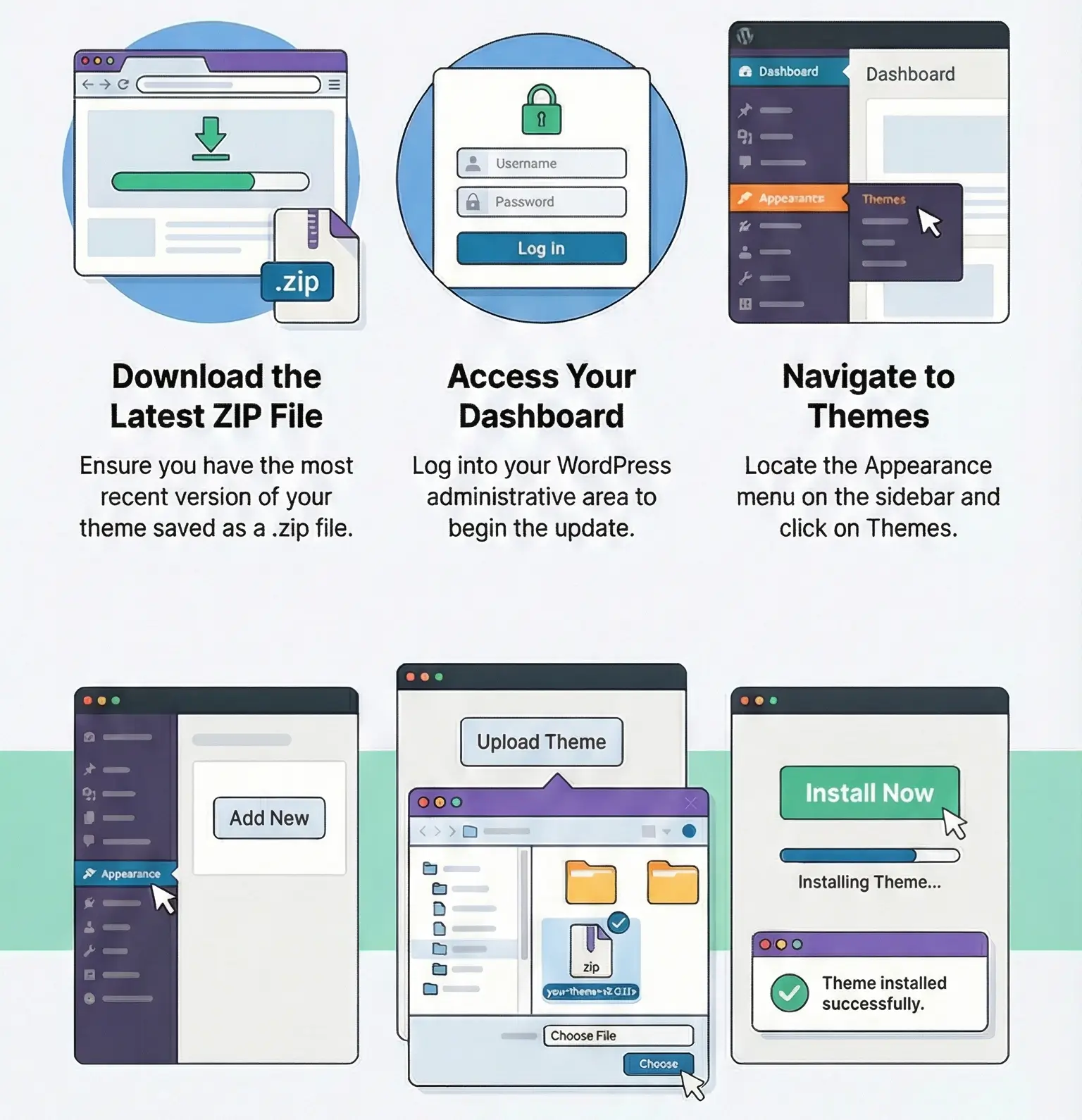
Yes, if the plugin is already installed. What you lose is auto-updates, support, and access to license-based services. Manual ZIP updates still work.
Usually delayed JS. Exclude wc-add-to-cart-variation, and if the issue remains, also exclude jquery-core from delay. Then clear WP Rocket cache and browser cache.
Because those pages build styles dynamically or load content via Ajax. Turn off Remove Unused CSS first. If needed, keep minify/lazyload on and leave CSS delivery conservative.
Open Console for JS dependency errors and Network to see which scripts are delayed or loaded late. The usual suspects are theme bundles, Elementor frontend files, WooCommerce variation scripts, and popup/slider assets.
All products we provide come only from official sources and verified developers. To confirm their integrity and safety, the archive has been scanned for viruses and malware. You can review the scan results at any time by clicking the button below.
View in VirusTotal| Feature | Nodub GPL Package | Official Vendor |
|---|---|---|
| Package files | Yes | Yes |
| GPL Redistribution | Yes | N/A |
| Official License Key | No | Yes |
| Unlimited Website Usage | Yes | No |
| Official Developer Support | No | Yes |
| Nodub.com Support | Yes | No |
| Automatic Vendor Updates | No | Yes |
| Manual Updates | Yes | Yes |
You can use any product from our store on as many websites as you like.
Single purchase includes download access for 72 hours. Future version downloads require repurchase or an active membership.
Manual updates are available to customers with active access.
Yes, we do. In most cases, you can expect a reply within 24–72 business hours. For simpler issues, we’re often able to respond much sooner.
You can contact us via live chat or open a support ticket directly from the product page — whichever is more convenient for you.
No, there are no limits. We don’t believe in restricting downloads. If you need to download a product multiple times, that’s absolutely fine.
We use professional, high‑performance storage systems to ensure downloads are fast, stable, and hassle‑free.
No, license keys are not included. In the past, license sharing and related issues caused account problems, so we decided to stop distributing keys.
That said, all products you receive are fully authentic. For items that normally require activation, we provide them pre‑activated, allowing you to install and use them immediately without dealing with license input or activation errors.
Yes — 100%. All products are original and distributed under the GNU GPL v2/v3 license.
The main difference compared to purchasing directly from the original author is that we don’t offer additional services such as custom development or one‑on‑one support. License keys are also not included. Instead, products that typically require activation are delivered ready to use, allowing installation on unlimited websites.
Yes, we stand behind our products. If you encounter an issue that cannot be resolved or a technical problem without a workable solution, we’ll do our best to help — and if necessary, issue a full refund.
Please note that refunds are not available if the product works as described but simply does not meet personal expectations. We’ve also encountered cases where refund requests were made while the product was still in use, which we cannot allow.
Our approach is simple: fairness and transparency. If you ever have a concern, just reach out — we’re always open to finding a reasonable solution that works for both sides.






Sergei –
WP Rocket improves overall website responsiveness, especially on content-heavy pages, thanks to its streamlined optimization tools.
Victoria –
This plugin provides noticeable improvements in loading performance, especially on pages with heavier content. The setup is straightforward and the features work as described.
Siar Bvcx –
Could You update to the latest version 3.20.1.2, please?!
Thanks in advance!
Support –
Hi there, the theme was updated to latest version
hunglehn98 –
Updated please WP Rocket 3.20.1.1
Support –
Hello. Updated.
Major –
Great store with fair prices and reliable service. Products are always genuine and delivered fast.
Bui Van Binh –
please update to the new version – Thanks
Support –
Hi, updated
John –
Wow that’s great. The info is really helpful. Very nice. Great work.
donkihote8491 –
Cool, thanks to nodub.com
Michel Mamiherintsoa RAINIANJA –
Updated pls. WP Rocket 3.20.1.1
Support –
Hello. Updated.
prowerka –
Your comment could be here
Tanvir Sorkar –
It works well thank you
Vlad –
WP Rocket is truly one of the best plugins for speeding up WordPress sites: right after activation, it enables a variety of automatic optimizations (page and browser caching, GZIP compression, lazy loading of images, and more).
Support –
Thank you for your purchase. We’ve sent you a discount code for our products.