

State: Product Activated


Official Version
Official version provided by the developers. Licensed under the GNU GPL, allowing use on an unlimited number of sites.
Technical Support
Professional assistance with any technical issues. Support is included in the price. Read our Support Policy.
Guarantees and Safety
100% safe and fully functional product. Completely risk‑free. 14‑day money‑back guarantee. Read our Refund Policy.
When I need to quickly deploy a site for a digital marketing agency, I often reach for SEOWP. It’s built specifically for this niche, meaning I don’t have to waste time manually registering Custom Post Types for Case Studies, Services, or Portfolios—it’s all baked in. It provides a highly specialized aesthetic right out of the box, tailored for displaying data, pricing tables, and marketing metrics.
Internally, SEOWP handles its core functionality by separating design from data. While the visual styling lives in the standard style.css and template files, the heavy lifting for its custom post types and shortcodes is usually handled by a required companion plugin. Theme options are saved directly into the wp_options table. The theme enqueues a significant amount of custom assets, particularly specialized icon fonts (flat icons for SEO, social media, etc.) and specific JavaScript libraries for its animated charts and sliders.
All products we provide come only from official sources and verified developers. To confirm their integrity and safety, the archive has been scanned for viruses and malware. You can review the scan results at any time by clicking the button below.
View in VirusTotalThis heavy reliance on bundled assets is exactly where I see SEOWP break down, especially on highly optimized servers. The most common issue I run into is broken custom icons—they suddenly render as empty squares. This almost always happens when you put the site behind a CDN (like Cloudflare) or use WP Rocket, which changes how fonts are served. I fix this by checking the DevTools Network tab for CORS (Cross-Origin Resource Sharing) policy blocks. You usually need to add an Access-Control-Allow-Origin header in your .htaccess file or explicitly exclude the theme’s /assets/fonts/ directory from your CDN URL rewriting rules.
Another frequent headache involves bundled plugins. SEOWP often packages third-party tools for mega menus or page building. When WordPress pushes a major update (like a jQuery migration), these bundled plugins can throw console errors (e.g., Uncaught TypeError: ... is not a function), breaking dropdown menus or mobile navigation. The fastest workaround is to identify the failing script in the Console, and if a manual plugin update isn’t available, dequeue the problematic script in your child theme’s functions.php and replace it with a vanilla JS alternative.
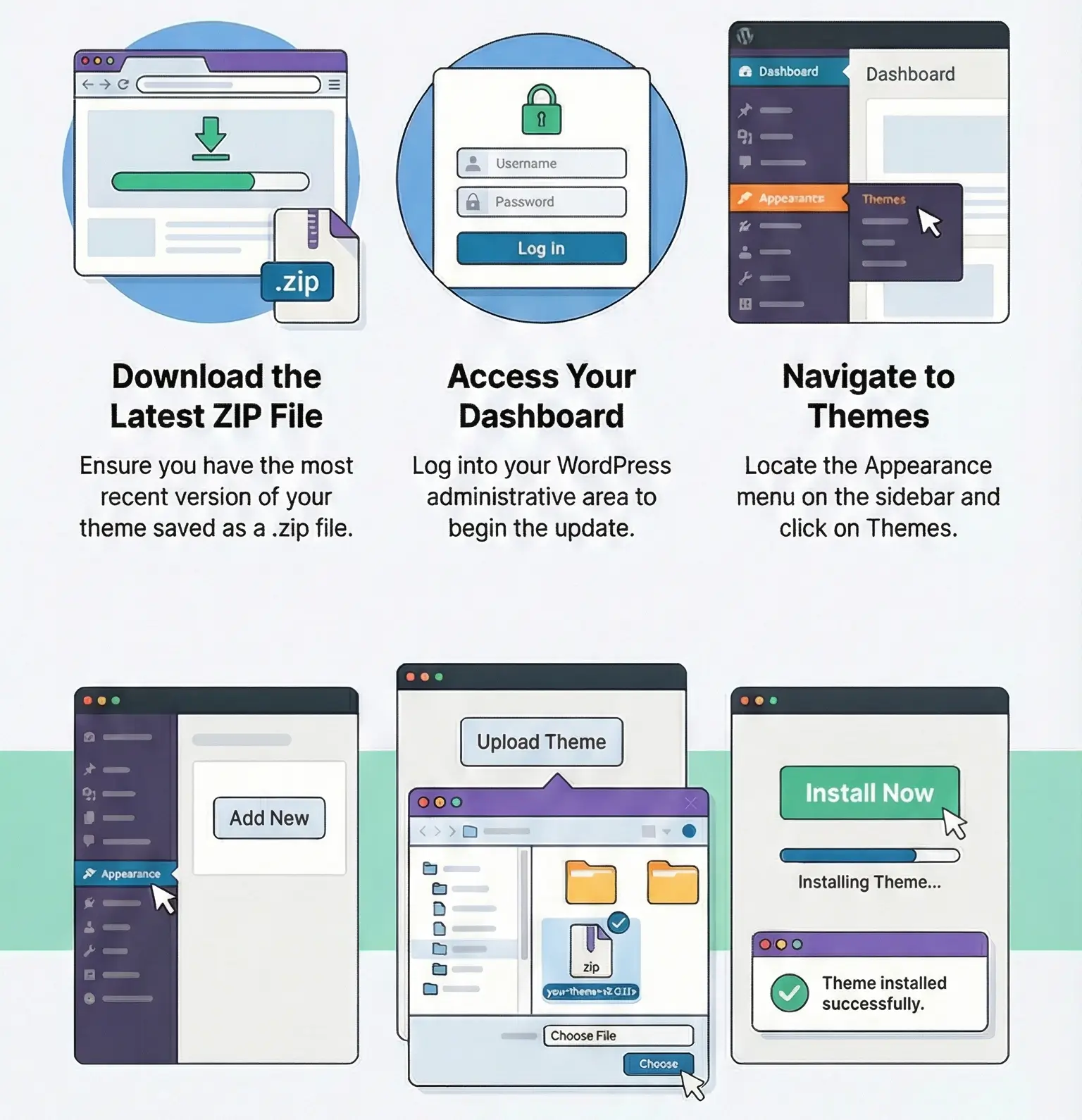
Regarding licensing, this specific copy of SEOWP is activated and fully working without any restrictions. I’ve verified it personally. You do not need a license key to use the theme, access its templates, or publish your site. What you miss without an active premium license is direct support from the developer and automatic dashboard updates. To update SEOWP manually, simply download the latest theme ZIP, navigate to Appearance > Themes > Add New > Upload Theme, and let WordPress overwrite the existing files. Always use a child theme if you are modifying PHP templates or adding custom functions, otherwise, this manual update process will instantly wipe out your custom code.
Because SEOWP registers new Custom Post Types, WordPress needs to rebuild its rewrite rules. I fix this instantly by going to Settings > Permalinks and simply clicking “Save Changes” without modifying anything. This flushes the rewrite rules and restores the custom URLs.
SEOWP bundles a lot of features you might not use (like specific sliders or pricing tables). If you aren’t using them, the CSS and JS are still enqueued. I use a plugin like Asset CleanUp or Perfmatters to selectively dequeue the theme’s specific slider scripts and extra icon stylesheets on pages where they aren’t rendered.
It requires work. Because SEOWP relies on its own custom post types and often specific page builder modules for its layout, your Case Studies and Services data will remain in the database, but you will lose the frontend templates. You’ll need to manually map those CPTs to your new theme’s templates or recreate the layouts from scratch.
You can use any product from our store on as many websites as you like.
After purchasing a product, you’ll be able to download it — including the most recent version — for the next 72 hours. Once that period ends, you can either repurchase the product or switch to one of our membership plans.
With an active membership, updates are always included. You’ll have continuous access to the latest versions for as long as your membership remains active, without worrying about expiration dates.
Yes, we do. In most cases, you can expect a reply within 24–72 business hours. For simpler issues, we’re often able to respond much sooner.
You can contact us via live chat or open a support ticket directly from the product page — whichever is more convenient for you.
No, there are no limits. We don’t believe in restricting downloads. If you need to download a product multiple times, that’s absolutely fine.
We use professional, high‑performance storage systems to ensure downloads are fast, stable, and hassle‑free.
No, license keys are not included. In the past, license sharing and related issues caused account problems, so we decided to stop distributing keys.
That said, all products you receive are fully authentic. For items that normally require activation, we provide them pre‑activated, allowing you to install and use them immediately without dealing with license input or activation errors.
Yes — 100%. All products are original and distributed under the GNU GPL v2/v3 license.
The main difference compared to purchasing directly from the original author is that we don’t offer additional services such as custom development or one‑on‑one support. License keys are also not included. Instead, products that typically require activation are delivered ready to use, allowing installation on unlimited websites.
Yes, we stand behind our products. If you encounter an issue that cannot be resolved or a technical problem without a workable solution, we’ll do our best to help — and if necessary, issue a full refund.
Please note that refunds are not available if the product works as described but simply does not meet personal expectations. We’ve also encountered cases where refund requests were made while the product was still in use, which we cannot allow.
Our approach is simple: fairness and transparency. If you ever have a concern, just reach out — we’re always open to finding a reasonable solution that works for both sides.







Reviews
There are no reviews yet.