

State: Product Activated


Official Version
Official version provided by the developers. Licensed under the GNU GPL, allowing use on an unlimited number of sites.
Technical Support
Professional assistance with any technical issues. Support is included in the price. Read our Support Policy.
Guarantees and Safety
100% safe and fully functional product. Completely risk‑free. 14‑day money‑back guarantee. Read our Refund Policy.
Ohio is built for agencies, portfolios, design studios, freelancers, and presentation-heavy company sites where layout matters as much as content structure. I use themes like this when the client wants a polished front end fast, but still expects enough control to reshuffle pages without touching templates every week. It is not a “tiny clean blog” theme. It is a design system wrapped around WordPress, with its own visual language, template parts, demo logic, animation stack, and page-builder integration.
What I like here is that Ohio usually makes sense to the person editing the site, not just the person building it. Headers, portfolio layouts, project pages, typography presets, color controls, prebuilt blocks — all of that is surfaced in admin instead of being buried in PHP. But that convenience has a cost: the site becomes dependent on the theme’s asset pipeline and its builder ecosystem. If the stack is healthy, it feels smooth. If optimization or third-party overrides get aggressive, the front end starts misbehaving in very specific ways.
Ohio is typically driven by a combination of theme options, page-level settings, demo content structures, and builder-managed layouts. In practice, the visual result is split across several layers:
That split matters. If a heading color changes globally, that is usually a theme option or typography preset. If one landing page ignores it, the builder template or page-level override is winning. If a portfolio archive looks wrong, I check the archive template logic before touching the page builder, because archive rendering is often theme-controlled even on builder-heavy setups.
Internally, Ohio behaves like a modern premium WordPress theme: PHP templates define the structural fallback, theme options store design settings in the database, and the frontend is assembled from enqueued CSS/JS plus builder-rendered content blocks. The important distinction is what lives where.
Content itself — pages, posts, portfolio items — stays in WordPress tables as normal. Theme options are stored in the database and can usually be exported/imported. Layout composition often depends on the active builder, so page markup may be generated dynamically rather than coming from a classic static PHP page template. That means editing a page in wp-admin and editing the site’s real output are not always the same thing. The page content can be native, while the final structure is shaped by builder wrappers, theme classes, animation attributes, lazyload behavior, and JS-initialized components.
When I troubleshoot Ohio, I usually check four things first:
That asset order part is not cosmetic. Themes like this often rely on a chain of dependencies: core scripts, builder assets, theme scripts, optional sliders, animation libraries, icon fonts, and sometimes AJAX-loaded fragments. If optimization plugins delay or combine the wrong files, sections can appear unstyled, animated blocks stop initializing, sticky headers fail, mobile menus don’t open, or portfolio filters stop responding.
The fix is usually boring but effective: open DevTools, check Console for JS errors, then in Network confirm whether theme CSS and builder JS actually load and are not blocked, deferred into nonsense, or replaced by stale cached files. On sites using WP Rocket, LiteSpeed Cache, Autoptimize, or Cloudflare optimizations, I often exclude:
jquery-coreIf the theme has generated CSS or dynamic style files, I also regenerate them from the theme panel or builder tools before wasting time on custom CSS.
The first common failure is demo import that looks “successful” but produces a half-broken site. Pages exist, but fonts, images, menu assignments, homepage settings, or theme options are incomplete. That happens because demo import is not just content import; it also depends on bundled plugins, remote package retrieval, option sets, widget areas, and sometimes server limits. On weak hosting, the importer times out midway and leaves the site in an inconsistent state.
My fix path is simple:
The second failure is speed optimization breaking interactive sections. Ohio sites often use animation, sticky elements, carousels, counters, filters, parallax, and portfolio transitions. These are not passive decorations; they are JS-driven UI pieces. Delay too much, and the site technically loads but feels broken. I have seen portfolio grids render as plain stacked blocks because the filtering script never initialized, and I have seen hero sections collapse because deferred assets changed timing for builder-calculated heights.
Concrete example: after enabling JS delay, the menu works on desktop but not on mobile, and animated sections freeze. In DevTools Console, you will usually see either a dependency error or a null-reference from theme JS trying to bind before the DOM/module it expects is ready. The fastest workaround is not “optimize better.” It is to stop delaying the theme’s core frontend script and the builder frontend handles, purge all caches, and retest on an actual inner page, not just the homepage.
The third weak point is direct parent-theme editing. People tweak header files, template parts, or CSS in the parent theme because it is quick. Then the next update wipes it. Ohio is not unusual here, but on design-heavy themes the temptation is stronger because everything looks editable until you hit the part that is actually hardcoded. My rule is strict: visual settings in theme options, layout content in the builder, code changes in a child theme only. If you need to override a template, do it there. Otherwise manual updates turn into rollback jobs.
All products we provide come only from official sources and verified developers. To confirm their integrity and safety, the archive has been scanned for viruses and malware. You can review the scan results at any time by clicking the button below.
View in VirusTotalOn my side, Ohio is activated, working, and personally checked. In normal WordPress use, the theme can run without a license key in the technical sense, but the missing part is the vendor-connected convenience layer.
Without official activation, you usually lose:
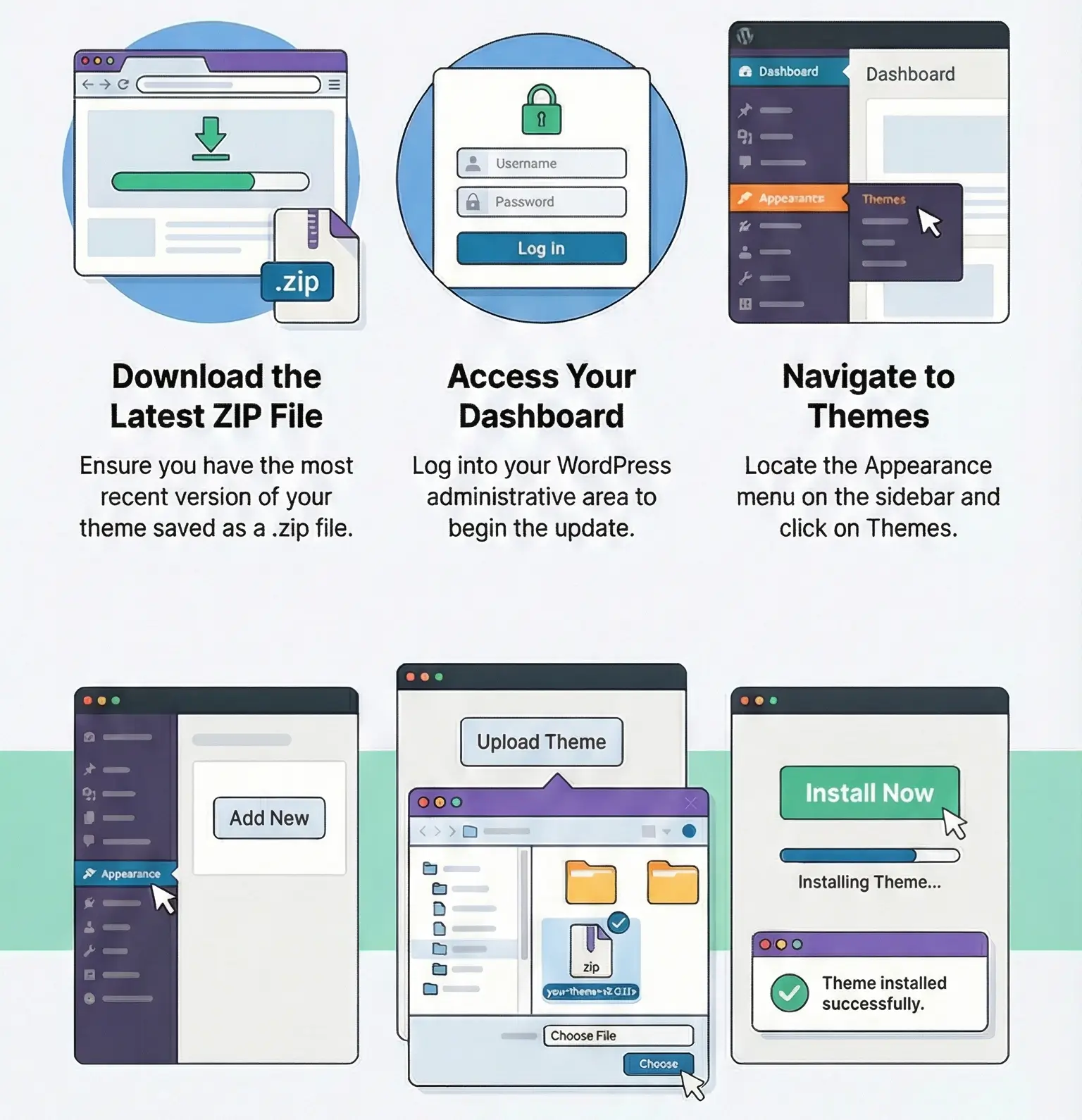
The site itself does not suddenly stop rendering just because a key is absent. The real issue is maintenance. Manual updates are done by uploading the new theme ZIP in Appearance > Themes or replacing the parent theme via FTP. If you changed the parent theme directly, those edits will be overwritten. That is exactly why I treat a child theme as non-optional on Ohio installs that go beyond stock demo content.
After a manual update, I check these pages first:
If those survive, the rest of the site is usually fine.
Yes, the theme can run, but you generally lose automatic updates, official support, and possibly vendor-linked demo/library convenience.
Mobile menu, sliders, animated sections, portfolio filters, and sticky header logic. The fix is usually excluding the theme core JS, builder frontend scripts, and jquery-core from delay/defer.
Mostly yes. Pages and many global visuals are editable through the builder and theme options. Archive behavior, some template structure, and deeper logic still live in theme files.
Parent theme edits get overwritten. If custom code is not in a child theme, a manual update can remove template and CSS changes immediately.
You can use any product from our store on as many websites as you like.
After purchasing a product, you’ll be able to download it — including the most recent version — for the next 72 hours. Once that period ends, you can either repurchase the product or switch to one of our membership plans.
With an active membership, updates are always included. You’ll have continuous access to the latest versions for as long as your membership remains active, without worrying about expiration dates.
Yes, we do. In most cases, you can expect a reply within 24–72 business hours. For simpler issues, we’re often able to respond much sooner.
You can contact us via live chat or open a support ticket directly from the product page — whichever is more convenient for you.
No, there are no limits. We don’t believe in restricting downloads. If you need to download a product multiple times, that’s absolutely fine.
We use professional, high‑performance storage systems to ensure downloads are fast, stable, and hassle‑free.
No, license keys are not included. In the past, license sharing and related issues caused account problems, so we decided to stop distributing keys.
That said, all products you receive are fully authentic. For items that normally require activation, we provide them pre‑activated, allowing you to install and use them immediately without dealing with license input or activation errors.
Yes — 100%. All products are original and distributed under the GNU GPL v2/v3 license.
The main difference compared to purchasing directly from the original author is that we don’t offer additional services such as custom development or one‑on‑one support. License keys are also not included. Instead, products that typically require activation are delivered ready to use, allowing installation on unlimited websites.
Yes, we stand behind our products. If you encounter an issue that cannot be resolved or a technical problem without a workable solution, we’ll do our best to help — and if necessary, issue a full refund.
Please note that refunds are not available if the product works as described but simply does not meet personal expectations. We’ve also encountered cases where refund requests were made while the product was still in use, which we cannot allow.
Our approach is simple: fairness and transparency. If you ever have a concern, just reach out — we’re always open to finding a reasonable solution that works for both sides.



Reviews
There are no reviews yet.