

State: Product Activated


Official Version
Official version provided by the developers. Licensed under the GNU GPL, allowing use on an unlimited number of sites.
Technical Support
Professional assistance with any technical issues. Support is included in the price. Read our Support Policy.
Guarantees and Safety
100% safe and fully functional product. Completely risk‑free. 14‑day money‑back guarantee. Read our Refund Policy.
LeadEngine is the “I need a polished site fast” theme. Agency landing pages, SaaS, corporate, a bit of portfolio, sometimes even a simple WooCommerce shop. I use it when the client wants that Envato demo look with minimal design work, and they’re fine living inside a page builder.
The trade-off is obvious the moment you open a page: it’s WPBakery-first. Great for speed of assembly. Not great if you want clean Gutenberg content or you plan to switch themes later (shortcode lock-in is real: vc_row... everywhere).
Most of the “magic” comes from a bundle of parts working together:
wp_options, so it migrates with the database.post_content. The front-end renderer is WPBakery + theme CSS. If WPBakery is disabled, your pages don’t “half work” — they basically collapse./wp-content/themes/leadengine/woocommerce/Assets are typically heavy: theme main CSS, WPBakery CSS, Google Fonts, icon fonts, and JS for sliders/animations. When people “optimize” blindly, they usually break interactive elements first.
Editable vs hardcoded in practice:
1) WPBakery editor doesn’t load / stuck spinner
Root causes I see most: mixed-content, aggressive minify, or a JS error from another plugin.
Fast path:
js_composer assets. If they’re blocked, it’s usually a security plugin rule or wrong file perms.2) Animations, sliders, counters “randomly” stop working
This is almost always script delay/defer order.
Fix that works more than it should:
jquery-corejs_composer_front or similar)leadengine*.js)3) Demo import hangs or imports half a site
LeadEngine demos are plugin-dependent. Missing one required plugin = missing chunks of layout.
My checklist:
memory_limit 256M+ and a sane max_execution_time.All products we provide come only from official sources and verified developers. To confirm their integrity and safety, the archive has been scanned for viruses and malware. You can review the scan results at any time by clicking the button below.
View in VirusTotalThe theme will generally run without a key, but without activation you typically lose one-click updates, vendor support, and sometimes demo importer access (depends on how the bundle is packaged).
In my package it’s activated and working — I tested it.
Manual update path:
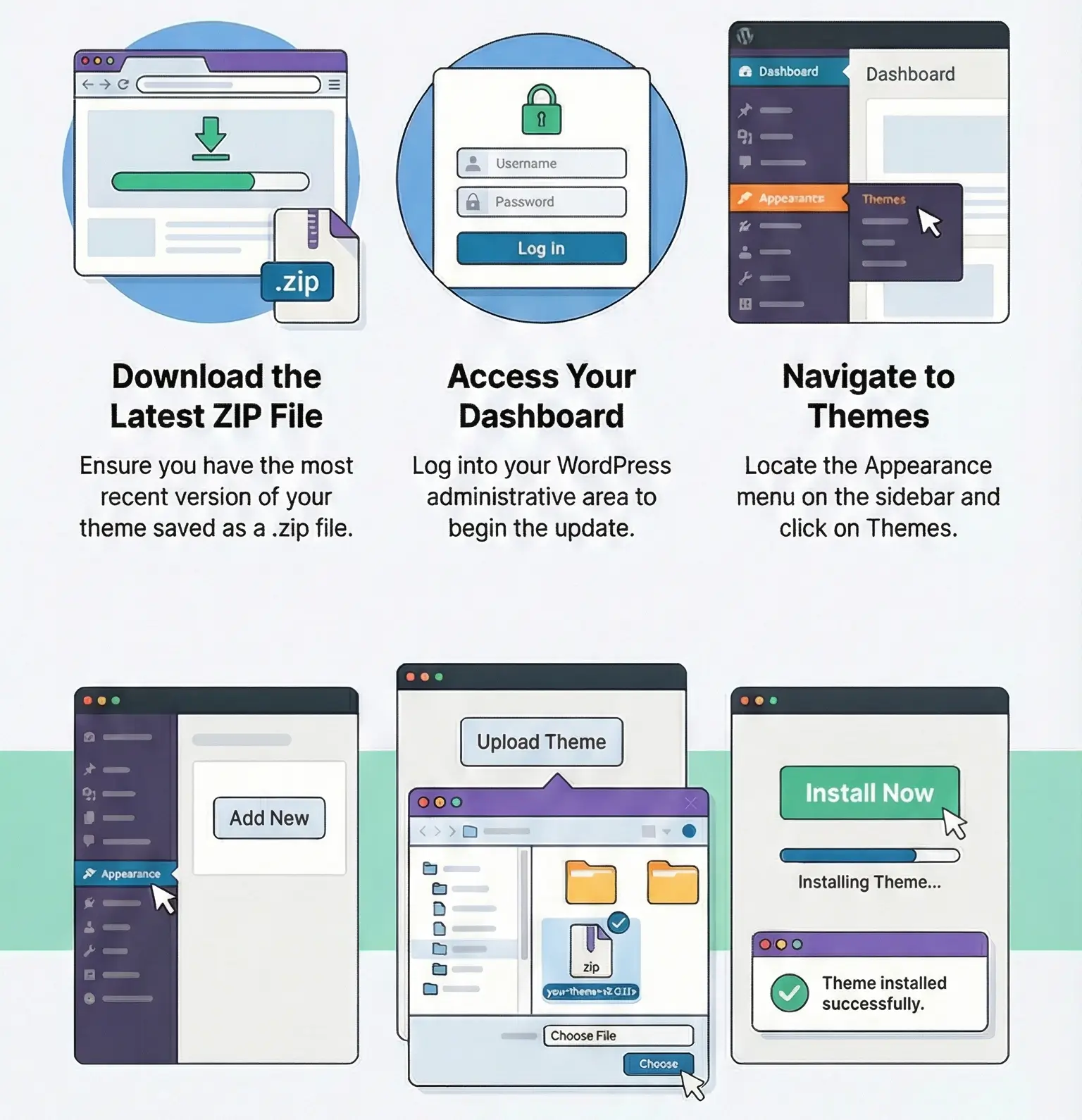
You can find detailed instructions on how to update a theme or plugin on this page.
Not cleanly. WPBakery content is shortcode-based; switching themes/builders usually means rebuilding key pages.
Too many animated modules + large background images. I disable non-essential animations in Theme Options (if available) and verify image sizes in DevTools → Network.
Yes for basic shops. If you update Woo and see template warnings, check the theme’s /woocommerce/ overrides and update the theme first.
Theme options for layout; CSS for visuals; child theme (or a small custom plugin with hooks) for markup changes. Parent theme edits don’t survive updates.
You can use any product from our store on as many websites as you like.
After purchasing a product, you’ll be able to download it — including the most recent version — for the next 72 hours. Once that period ends, you can either repurchase the product or switch to one of our membership plans.
With an active membership, updates are always included. You’ll have continuous access to the latest versions for as long as your membership remains active, without worrying about expiration dates.
Yes, we do. In most cases, you can expect a reply within 24–72 business hours. For simpler issues, we’re often able to respond much sooner.
You can contact us via live chat or open a support ticket directly from the product page — whichever is more convenient for you.
No, there are no limits. We don’t believe in restricting downloads. If you need to download a product multiple times, that’s absolutely fine.
We use professional, high‑performance storage systems to ensure downloads are fast, stable, and hassle‑free.
No, license keys are not included. In the past, license sharing and related issues caused account problems, so we decided to stop distributing keys.
That said, all products you receive are fully authentic. For items that normally require activation, we provide them pre‑activated, allowing you to install and use them immediately without dealing with license input or activation errors.
Yes — 100%. All products are original and distributed under the GNU GPL v2/v3 license.
The main difference compared to purchasing directly from the original author is that we don’t offer additional services such as custom development or one‑on‑one support. License keys are also not included. Instead, products that typically require activation are delivered ready to use, allowing installation on unlimited websites.
Yes, we stand behind our products. If you encounter an issue that cannot be resolved or a technical problem without a workable solution, we’ll do our best to help — and if necessary, issue a full refund.
Please note that refunds are not available if the product works as described but simply does not meet personal expectations. We’ve also encountered cases where refund requests were made while the product was still in use, which we cannot allow.
Our approach is simple: fairness and transparency. If you ever have a concern, just reach out — we’re always open to finding a reasonable solution that works for both sides.





Reviews
There are no reviews yet.