

State: Product Activated


Official Version
Official version provided by the developers. Licensed under the GNU GPL, allowing use on an unlimited number of sites.
Technical Support
Professional assistance with any technical issues. Support is included in the price. Read our Support Policy.
Guarantees and Safety
100% safe and fully functional product. Completely risk‑free. 14‑day money‑back guarantee. Read our Refund Policy.
Germanized Pro is one of those plugins that only makes sense if you’ve already felt the limitations of plain WooCommerce in a German or broader EU storefront. Out of the box, WooCommerce is flexible, yes — but “technically sellable” and “regionally compliant enough to launch” are not the same thing.
That’s where Germanized Pro earns its place.
I use it for stores that need the practical extras local shops always run into sooner or later: legal checkboxes at checkout, shipping time labels, unit pricing, VAT display logic, delivery information, document flow, and all the small but important storefront details that standard WooCommerce leaves to custom code or a patchwork of plugins.
It is not magic, and it is definitely not a substitute for legal review. But as a technical layer for German-market WooCommerce work, it saves a lot of time.
Germanized Pro doesn’t replace WooCommerce. It extends it.
Under the hood, it works the way a well-behaved WooCommerce plugin should: through hooks, checkout field filters, order meta, product meta, additional settings panels, email/document outputs, and frontend template integration. In other words, it sits on top of native WooCommerce objects rather than trying to build a parallel shop system.
In practice, that usually means:
That architecture is good news for maintainability. Your products stay WooCommerce products, your orders stay WooCommerce orders, and most of the plugin’s logic lives in options, meta fields, and hooked output.
Still, there’s a catch. Because so much of it depends on hooks and templating, bad theme overrides can break the visible parts while the underlying data remains perfectly fine.
The first place Germanized Pro breaks is rarely the database. It’s the frontend output.
A theme ships with custom WooCommerce templates. A page builder rewrites product layout. A checkout plugin replaces native fields. Suddenly shipping times disappear, legal text is in the wrong place, unit prices don’t render, or checkout checkboxes behave inconsistently.
That’s the pattern.
If I’m debugging it, I check three things first:
This is especially common on stores using:
And yes, optimization plugins can make it worse. Delay the wrong JS, cache the wrong fragment, and you get a checkout that looks fine but stops validating correctly.
My practical workflow is simple:
/woocommerce/ before blaming Germanized itself.A lot of “plugin bug” reports turn out to be template collisions.
This is the part many store owners miss.
Germanized Pro can store the right data and still appear “not working” if your theme has outdated WooCommerce templates or custom single-product markup that simply never calls the hooks Germanized relies on. The plugin is often technically active, but the theme gives it nowhere clean to print its output.
That’s why I treat visual compliance failures as a template problem first, not a settings problem.
Typical examples:
When that happens, I compare the affected template with default WooCommerce behavior before changing plugin settings. Much faster. Usually more honest, too.
One thing I would not oversell: plugins like this can help implement compliance-related mechanics, but they do not replace legal advice. That matters.
Germanized Pro can surface the right kinds of fields, notices, price contexts, and checkout controls. It can help with the technical implementation of what your legal setup requires. But whether the text, policy structure, tax handling, or document wording is actually correct for your business model is a separate question.
So my rule is straightforward:
That division keeps projects sane.
All products we provide come only from official sources and verified developers. To confirm their integrity and safety, the archive has been scanned for viruses and malware. You can review the scan results at any time by clicking the button below.
View in VirusTotalIn most WordPress setups, if the PRO plugin files are already installed correctly, the plugin will run without a connected license key. The license is typically what enables vendor update delivery and official support, not the core PHP execution of the plugin itself.
Usually, without a valid license connection, you lose:
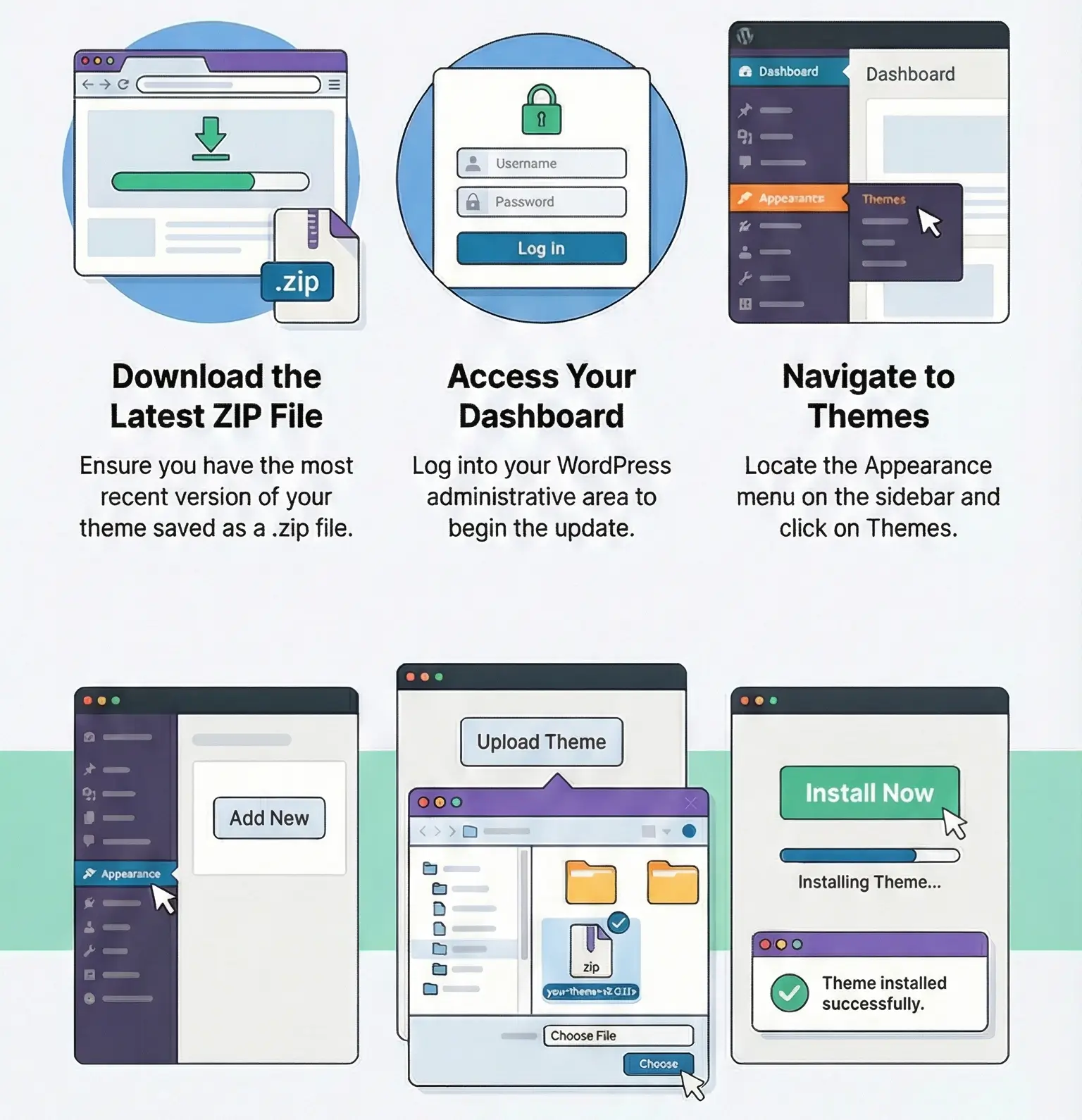
Manual updating is standard WordPress work:
The bigger risk is not activation. It’s updating a live store without staging.
Because this plugin touches checkout, product output, emails, and legal display logic, I would always test updates on a staging copy first — especially if the shop also runs custom WooCommerce templates or a page-builder-based product layout. This is not the plugin category where you update blindly on Friday evening and hope for the best.
No. It extends WooCommerce with additional compliance, pricing, delivery, checkout, and document-related features.
Usually because the theme or another WooCommerce customization plugin overrides the output hooks or templates Germanized expects.
Yes. Full-page cache, cart fragments, or checkout optimization can cause stale markup or broken validation if configured too aggressively.
Not by itself. It helps implement the technical side, but it does not replace legal review or business-specific legal guidance.
In many setups, yes, if the plugin files are already installed. But auto-updates and official support are usually tied to a valid license.
You can use any product from our store on as many websites as you like.
After purchasing a product, you’ll be able to download it — including the most recent version — for the next 72 hours. Once that period ends, you can either repurchase the product or switch to one of our membership plans.
With an active membership, updates are always included. You’ll have continuous access to the latest versions for as long as your membership remains active, without worrying about expiration dates.
Yes, we do. In most cases, you can expect a reply within 24–72 business hours. For simpler issues, we’re often able to respond much sooner.
You can contact us via live chat or open a support ticket directly from the product page — whichever is more convenient for you.
No, there are no limits. We don’t believe in restricting downloads. If you need to download a product multiple times, that’s absolutely fine.
We use professional, high‑performance storage systems to ensure downloads are fast, stable, and hassle‑free.
No, license keys are not included. In the past, license sharing and related issues caused account problems, so we decided to stop distributing keys.
That said, all products you receive are fully authentic. For items that normally require activation, we provide them pre‑activated, allowing you to install and use them immediately without dealing with license input or activation errors.
Yes — 100%. All products are original and distributed under the GNU GPL v2/v3 license.
The main difference compared to purchasing directly from the original author is that we don’t offer additional services such as custom development or one‑on‑one support. License keys are also not included. Instead, products that typically require activation are delivered ready to use, allowing installation on unlimited websites.
Yes, we stand behind our products. If you encounter an issue that cannot be resolved or a technical problem without a workable solution, we’ll do our best to help — and if necessary, issue a full refund.
Please note that refunds are not available if the product works as described but simply does not meet personal expectations. We’ve also encountered cases where refund requests were made while the product was still in use, which we cannot allow.
Our approach is simple: fairness and transparency. If you ever have a concern, just reach out — we’re always open to finding a reasonable solution that works for both sides.



Reviews
There are no reviews yet.