
State: Product Activated

Official Version
Official version provided by the developers. Licensed under the GNU GPL, allowing use on an unlimited number of sites.
Technical Support
Professional assistance with any technical issues. Support is included in the price. Read our Support Policy.
Guarantees and Safety
100% safe and fully functional product. Completely risk‑free. 14‑day money‑back guarantee. Read our Refund Policy.
I use WP All Import Pro when content has to land in WordPress from messy XML or CSV, not from a neat REST apishka or a one-time manual upload. It’s for migrations, supplier feeds, bulk catalog imports, property listings, jobs, users, custom post types, ACF fields, Woo products — basically any case where native importer falls apart after the second column.
What I like here is simple: it doesn’t force a rigid schema. I can map fields manually, run imports in chunks, update existing posts by ID/SKU/meta, and keep the site alive while the cron does the heavy lifting. For agencies and store admins, that saves hours in the adminka and avoids writing custom parsers for every feed.
Internally, the plugin parses XML/CSV, builds records, and writes them into standard WordPress tables: posts, postmeta, terms, termmeta, users, comments, plus addon-specific data for WooCommerce, ACF, JetEngine, and others. Import templates and settings are stored in the DB, while custom logic usually sits in the plugin UI or in PHP snippets attached through its action/filter system.
Most edits are configuration-level, not template-level. You change mapping in All Import → New Import / Manage Imports, define unique identifiers there, and set update rules for title, content, images, taxonomies, and custom fields. Nothing on the front changes by itself unless imported data is actually used by your theme templates or builder loops.
Asset-wise, there’s almost nothing critical on the frontend. This is mainly admin-side processing with AJAX steps, cron runs, and file handling. If an import hangs, I don’t waste time staring at page builders — I check All Import logs, WP Crontrol, PHP limits, and server error logs first. In DevTools, the useful tab is Network inside the admin import stepper: stalled AJAX requests, 403/500 responses, or timeouts usually point straight to mod_security, memory_limit, or a host killing long requests.
The most common failure is duplicated posts after repeated imports. Root cause is almost always a bad Unique Identifier. If the feed changes row order or an external ID is missing, WP All Import treats records as new. Fast fix: set a stable key like SKU, external ID, or a concatenated field, then rerun as update instead of fresh import.
The second classic issue is image import failing randomly. I’ve seen this caused by hotlink protection, redirects, WebP conversion on the CDN side, and hosts blocking remote requests. Fix path is concrete: open the image URL directly, inspect response headers, then check Console/Network for 403/404 and server logs for cURL errors. If the supplier rotates signed URLs, I download files locally first or run imports from a mirrored source.
On Woo sites, cache can also confuse results. The import completes, but products still show old price, stock, or attributes on the front. That’s not the importer “missing data”; it’s stale transients, page cache, or search index lag. I fix it by clearing object cache, regenerating product lookup tables if needed, and rebuilding search/index plugins after the run.
Large files break on weak hosting. If the server has low memory_limit, short max_execution_time, or no real cron, the process will crawl or stall. The fastest workaround is split the file, reduce batch size in import settings, switch from browser processing to cron, and stop running backups during the import window. A full bэкап plugin firing at the same time can lock I/O and turn a normal import into a timeout festival.
All products we provide come only from official sources and verified developers. To confirm their integrity and safety, the archive has been scanned for viruses and malware. You can review the scan results at any time by clicking the button below.
View in VirusTotalWP All Import Pro is activated and fully working, with no restrictions — I verified it personally. It runs fine for actual imports. Without an official license key, the usual trade-off is losing one-click updates and vendor support. Core functionality on the installed copy still works.
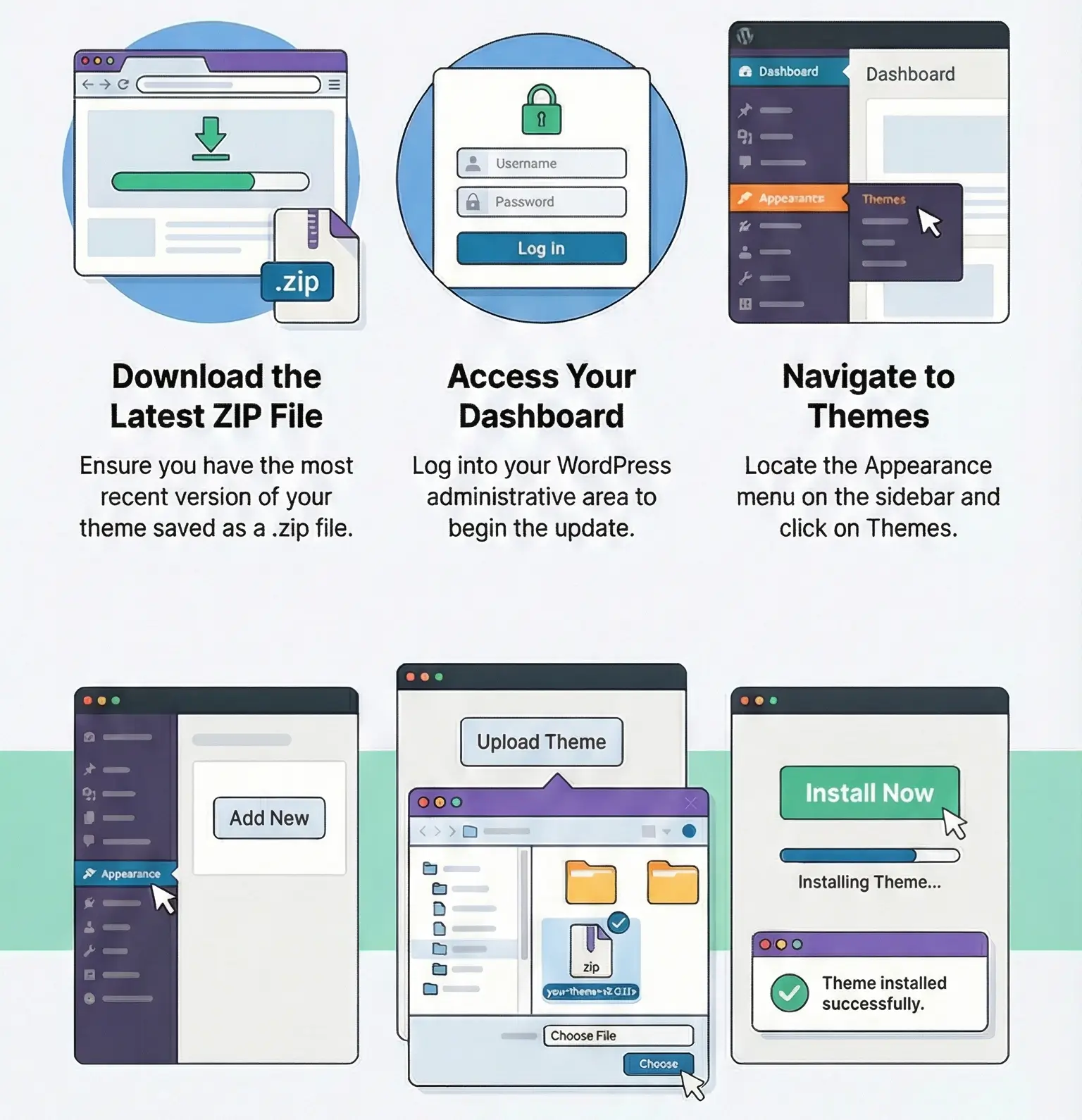
Manual updates are easy: upload the new ZIP in Plugins → Add New → Upload Plugin or replace via FTP. Before overwriting, make a backup. If you edited plugin files directly, the update will wipe those changes, so custom logic belongs in a small custom plugin, theme functions.php, or the plugin’s own PHP function hooks — not inside the parent plugin files.
Because the Unique Identifier is wrong or unstable. Use a fixed external ID, SKU, or another field that never changes between runs.
Usually remote blocking, redirects, expiring links, or CDN rules. Test the direct file URL in the browser and check import logs for cURL/HTTP errors
Yes. In the import settings, disable updates for title/content/images and leave only the fields you want to refresh.
Stale cache. Clear page cache/object cache, rebuild search index if used, and on Woo stores regenerate lookup data when attributes or stock stay outdated.
You can use any product from our store on as many websites as you like.
After purchasing a product, you’ll be able to download it — including the most recent version — for the next 72 hours. Once that period ends, you can either repurchase the product or switch to one of our membership plans.
With an active membership, updates are always included. You’ll have continuous access to the latest versions for as long as your membership remains active, without worrying about expiration dates.
Yes, we do. In most cases, you can expect a reply within 24–72 business hours. For simpler issues, we’re often able to respond much sooner.
You can contact us via live chat or open a support ticket directly from the product page — whichever is more convenient for you.
No, there are no limits. We don’t believe in restricting downloads. If you need to download a product multiple times, that’s absolutely fine.
We use professional, high‑performance storage systems to ensure downloads are fast, stable, and hassle‑free.
No, license keys are not included. In the past, license sharing and related issues caused account problems, so we decided to stop distributing keys.
That said, all products you receive are fully authentic. For items that normally require activation, we provide them pre‑activated, allowing you to install and use them immediately without dealing with license input or activation errors.
Yes — 100%. All products are original and distributed under the GNU GPL v2/v3 license.
The main difference compared to purchasing directly from the original author is that we don’t offer additional services such as custom development or one‑on‑one support. License keys are also not included. Instead, products that typically require activation are delivered ready to use, allowing installation on unlimited websites.
Yes, we stand behind our products. If you encounter an issue that cannot be resolved or a technical problem without a workable solution, we’ll do our best to help — and if necessary, issue a full refund.
Please note that refunds are not available if the product works as described but simply does not meet personal expectations. We’ve also encountered cases where refund requests were made while the product was still in use, which we cannot allow.
Our approach is simple: fairness and transparency. If you ever have a concern, just reach out — we’re always open to finding a reasonable solution that works for both sides.

Reviews
There are no reviews yet.