

State: Product Activated


Official Version
Official version provided by the developers. Licensed under the GNU GPL, allowing use on an unlimited number of sites.
Technical Support
Professional assistance with any technical issues. Support is included in the price. Read our Support Policy.
Guarantees and Safety
100% safe and fully functional product. Completely risk‑free. 14‑day money‑back guarantee. Read our Refund Policy.
WooCommerce AutomateWoo is for stores that have already outgrown “one newsletter plugin + one coupon plugin + hope.” I use it when the job is operational automation inside WooCommerce: abandoned carts, win-back emails, follow-ups after purchase, birthday coupons, review requests, VIP segmentation, and timed rules that react to actual order/customer data.
What I like here is the mechanics. It works inside WooCommerce’s own flow instead of bolting on a separate funnel builder. Triggers watch store events, rules filter the audience, actions send emails, generate coupons, change data, or queue the next step. If the store needs event-driven automation, this is the right class of plugin.
Most of the setup is in WooCommerce AutomateWoo → Workflows / Settings / Logs.
The workflows themselves are stored in the database; the plugin isn’t asking me to edit PHP just to build a recovery or follow-up sequence.
In practice, I edit:
Under the hood, the important part is the queue. Scheduled jobs run through Action Scheduler, so the health of the automation depends on those scheduled actions actually processing. If a store says “AutomateWoo stopped,” I check the queue before I touch the workflow logic.
The editable layer is broad. The hardcoded layer is custom actions, custom variables, and deep integration tweaks — those need code/snippets, not just settings.
The most common failure is not email design. It’s scheduling.
If WP-Cron is disabled, blocked, or starved, workflows sit there as pending and never fire on time. I check:
If the queue is stuck, the fastest fix is not “rebuild the workflow.”
I run pending actions, then set a real server cron to hit wp-cron.php reliably. That fixes more AutomateWoo installs than any plugin reinstall.
Second common break: abandoned cart tracking doesn’t capture properly.
Root causes are predictable:
I check DevTools → Network for requests/scripts containing automatewoo, and I verify WooCommerce essentials still load:
wc-cart-fragmentsjqueryjquery-coreIf JS optimization is on, I exclude the WooCommerce AutomateWoo frontend tracker and wc-cart-fragments from delay/defer first. If a consent banner is present, I whitelist AutomateWoo/Woo tracking before calling the workflow broken.
One more real issue: duplicate emails.
That usually happens when two workflows listen to nearly the same event, or a custom payment/checkout flow changes order status multiple times. I fix it by tightening the trigger/rules — for example, use a paid/completed transition instead of a broad order-created event.
All products we provide come only from official sources and verified developers. To confirm their integrity and safety, the archive has been scanned for viruses and malware. You can review the scan results at any time by clicking the button below.
View in VirusTotalAutomateWoo is a premium WooCommerce extension. In a properly installed setup, it runs normally without feature throttling.
Plain language:
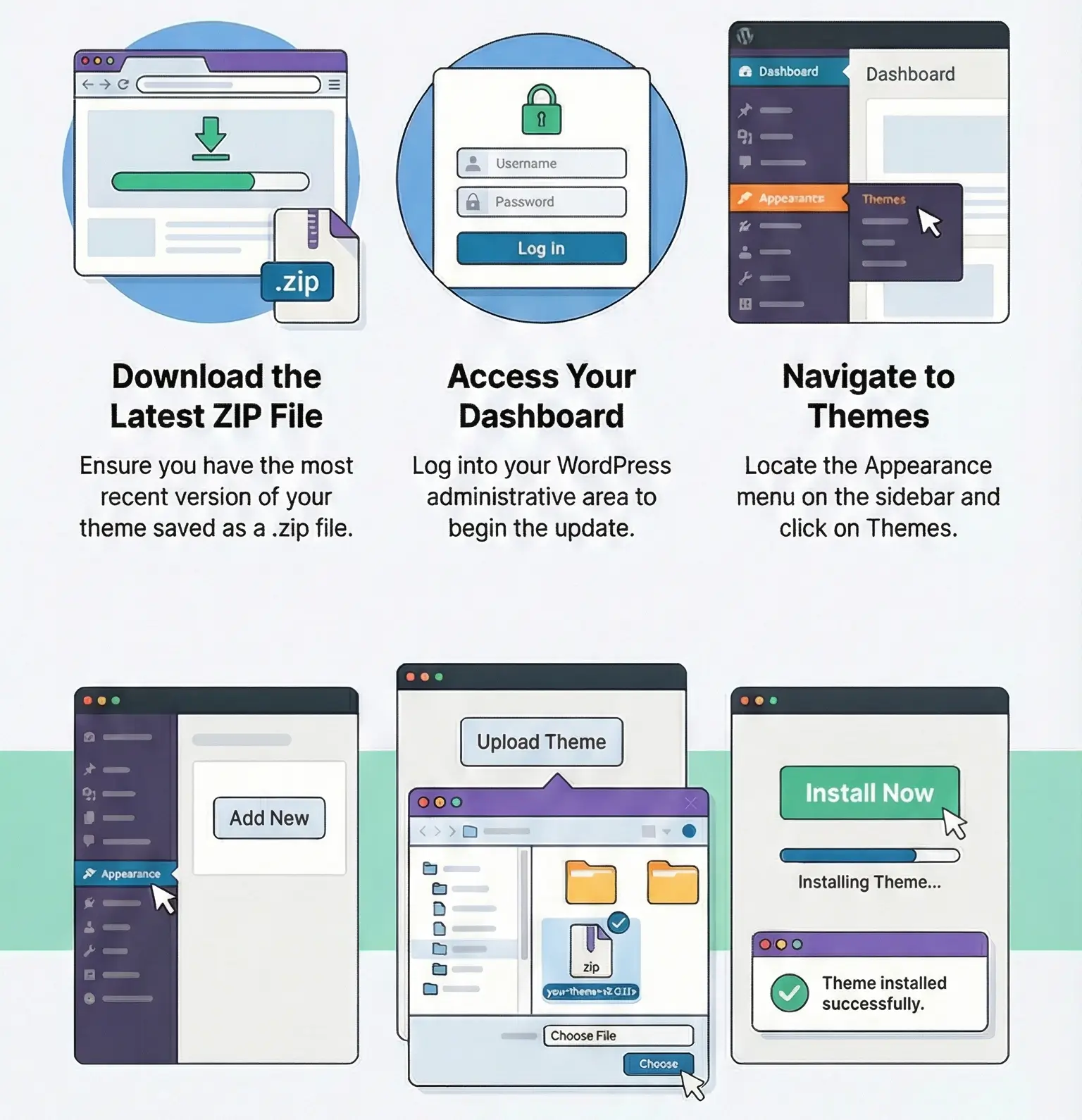
Manual update path is simple:
If you patched plugin files directly, the update overwrites them. I don’t do that. Custom logic belongs in snippets, a small custom plugin, or theme-side integration code — not inside AutomateWoo core.
Usually the Action Scheduler queue is stuck. Check WooCommerce → Status → Scheduled Actions and fix cron before editing workflows.
Frontend tracking is blocked — usually by cookie consent or JS delay. Exclude AutomateWoo tracking and wc-cart-fragments from optimization.
Two workflows are listening to overlapping order events, or the checkout/payment plugin fires multiple status changes. Narrow the trigger and add stricter rules.
Yes. Basic automations are UI-driven. For custom variables/actions, I add code in snippets or a small custom plugin, not in AutomateWoo files.
You can use any product from our store on as many websites as you like.
After purchasing a product, you’ll be able to download it — including the most recent version — for the next 72 hours. Once that period ends, you can either repurchase the product or switch to one of our membership plans.
With an active membership, updates are always included. You’ll have continuous access to the latest versions for as long as your membership remains active, without worrying about expiration dates.
Yes, we do. In most cases, you can expect a reply within 24–72 business hours. For simpler issues, we’re often able to respond much sooner.
You can contact us via live chat or open a support ticket directly from the product page — whichever is more convenient for you.
No, there are no limits. We don’t believe in restricting downloads. If you need to download a product multiple times, that’s absolutely fine.
We use professional, high‑performance storage systems to ensure downloads are fast, stable, and hassle‑free.
No, license keys are not included. In the past, license sharing and related issues caused account problems, so we decided to stop distributing keys.
That said, all products you receive are fully authentic. For items that normally require activation, we provide them pre‑activated, allowing you to install and use them immediately without dealing with license input or activation errors.
Yes — 100%. All products are original and distributed under the GNU GPL v2/v3 license.
The main difference compared to purchasing directly from the original author is that we don’t offer additional services such as custom development or one‑on‑one support. License keys are also not included. Instead, products that typically require activation are delivered ready to use, allowing installation on unlimited websites.
Yes, we stand behind our products. If you encounter an issue that cannot be resolved or a technical problem without a workable solution, we’ll do our best to help — and if necessary, issue a full refund.
Please note that refunds are not available if the product works as described but simply does not meet personal expectations. We’ve also encountered cases where refund requests were made while the product was still in use, which we cannot allow.
Our approach is simple: fairness and transparency. If you ever have a concern, just reach out — we’re always open to finding a reasonable solution that works for both sides.






ia573152 –
This version maintains the core positive messages (quick update, competitive price, excellent support, and future loyalty) while adopting a formal business tone.