

State: Product Activated


Official Version
Official version provided by the developers. Licensed under the GNU GPL, allowing use on an unlimited number of sites.
Technical Support
Professional assistance with any technical issues. Support is included in the price. Read our Support Policy.
Guarantees and Safety
100% safe and fully functional product. Completely risk‑free. 14‑day money‑back guarantee. Read our Refund Policy.
Thrive Ovation is a good fit when the site already relies on testimonials as a conversion element and the owner is tired of managing them as random posts, screenshots, emails, or manually styled blocks. I use plugins like this when the real problem is not “how do I show quotes on a page,” but “how do I collect, approve, tag, reuse, and display social proof without turning WordPress admin into a mess.”
For marketers and service sites, that workflow matters more than the widget itself. Ovation is built around collection and moderation first, display second. That’s the right priority. A testimonial plugin becomes useful only when it reduces admin friction: capture the proof, normalize the data, approve it once, and drop it into pages where needed.
This is not just a visual block library. Thrive Ovation stores testimonial items in WordPress and gives them a management layer—submission, approval, categorization, and insertion into pages. Depending on the version and stack, testimonial data is typically stored as a custom post type or structured internal records with meta attached for author name, role, company, image, source, status, and tags.
That distinction matters because the display part is only the surface. The plugin’s value comes from the workflow layer:
In practical terms, the content lives in the database, not in hardcoded PHP templates. That means testimonials are editable from admin and usually survive theme changes. The frontend output, however, depends on Thrive Architect or the plugin’s own rendering components, so layout and styling are often tied to the Thrive ecosystem rather than plain Gutenberg blocks or theme templates.
Assets are enqueued on pages where testimonial elements or capture forms are used. That usually includes CSS for cards/sliders and JS for dynamic layouts or form behavior. If the site uses aggressive optimization, these assets can get merged, delayed, or stripped in ways that break the visible output without touching the saved testimonial data.
The most common issue is not data loss. It’s broken display after caching, optimization, or partial Thrive Suite mismatch.
A real example: the testimonial grid or carousel loads unstyled for a second, then collapses into the wrong layout, or slider navigation doesn’t respond at all. Mechanically, the HTML is present, but the frontend script that initializes the component either loads too late, is deferred in the wrong order, or is blocked by minification conflicts. In DevTools → Console, I check for JS errors tied to Thrive frontend assets, jQuery dependencies, or generic minify failures. In Network, I verify that the plugin CSS and JS are actually returning 200 and not being excluded by a CDN rule or combined into a broken cache file.
Fast workaround:
jquery-core if the page still depends on itAnother recurring problem is collection flow not saving correctly. Usually that comes from one of three causes:
If a capture form submits but no testimonial appears in moderation, I check the browser Network tab for failed admin-ajax.php requests or REST calls, then confirm the site firewall isn’t blocking them. On hosts with aggressive ModSecurity rules, form handlers sometimes get silently interrupted. The fix is usually to whitelist the affected request pattern or test with the security layer temporarily relaxed.
There’s also a practical ecosystem caveat: Ovation makes the most sense inside Thrive Suite. If someone installs it expecting it to behave like a universal testimonial shortcode plugin for any random page builder, friction starts immediately. It can still work, but the cleanest editing experience is inside Thrive Architect. Outside that stack, the plugin feels less native.
All products we provide come only from official sources and verified developers. To confirm their integrity and safety, the archive has been scanned for viruses and malware. You can review the scan results at any time by clicking the button below.
View in VirusTotalOn my side, this product is activated, working, and personally verified. In normal WordPress terms, the plugin can run once installed, but official activation is what usually unlocks the comfortable part of ownership: direct updates, support, and access to connected Thrive services/features depending on the license state.
Without official account/license linkage, what you generally lose is:
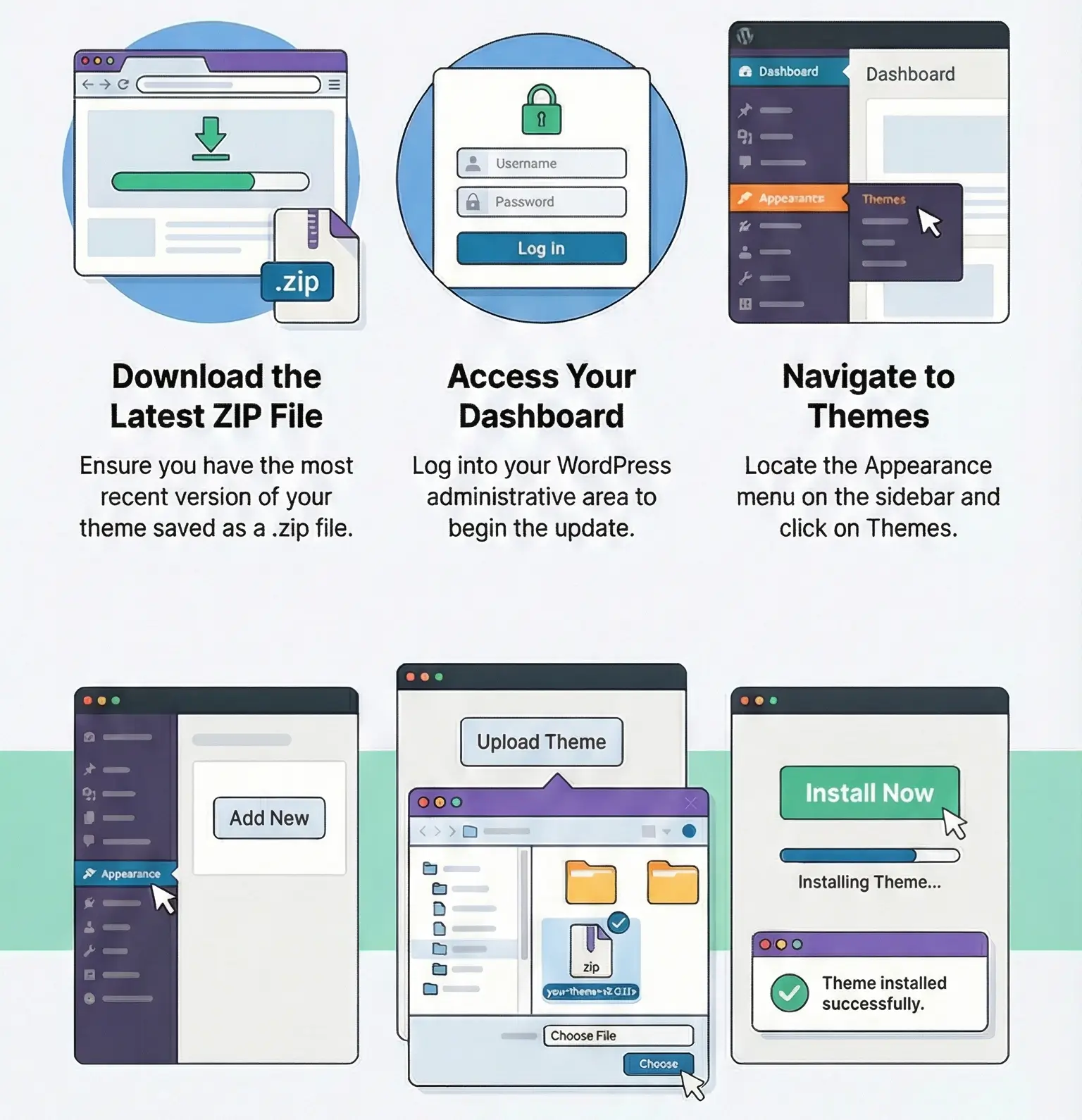
Manual updates are straightforward: deactivate the old version only if required by the package instructions, upload the new ZIP in Plugins → Add New → Upload Plugin, or replace the plugin folder via FTP. After that, clear caches and test both frontend display and admin moderation screens.
One important warning: if the site relies on multiple Thrive Ovation tools, update them as a set when possible. Mixed versions are where I see the weirdest issues—editor components missing, testimonial elements not rendering correctly, or admin UI controls behaving inconsistently. With a standalone plugin this is annoying; with a suite-style vendor stack it’s a common root cause.
Yes, in most cases. The data is stored in WordPress, not inside the theme. What may change is the styling or the way testimonial blocks are rendered on the frontend.
Usually a frontend JS optimization conflict. Check Console for Thrive asset errors and exclude Thrive scripts plus jquery-core from aggressive delay/defer on that page.
Yes, but it works best inside the Thrive ecosystem. If the site is built around another builder, the editing and display workflow may feel less integrated.
No, testimonial content stored in the database should remain intact. The risk is not data deletion—it’s version mismatch, cache residue, or broken rendering after the update if related Thrive components are out of sync.
You can use any product from our store on as many websites as you like.
After purchasing a product, you’ll be able to download it — including the most recent version — for the next 72 hours. Once that period ends, you can either repurchase the product or switch to one of our membership plans.
With an active membership, updates are always included. You’ll have continuous access to the latest versions for as long as your membership remains active, without worrying about expiration dates.
Yes, we do. In most cases, you can expect a reply within 24–72 business hours. For simpler issues, we’re often able to respond much sooner.
You can contact us via live chat or open a support ticket directly from the product page — whichever is more convenient for you.
No, there are no limits. We don’t believe in restricting downloads. If you need to download a product multiple times, that’s absolutely fine.
We use professional, high‑performance storage systems to ensure downloads are fast, stable, and hassle‑free.
No, license keys are not included. In the past, license sharing and related issues caused account problems, so we decided to stop distributing keys.
That said, all products you receive are fully authentic. For items that normally require activation, we provide them pre‑activated, allowing you to install and use them immediately without dealing with license input or activation errors.
Yes — 100%. All products are original and distributed under the GNU GPL v2/v3 license.
The main difference compared to purchasing directly from the original author is that we don’t offer additional services such as custom development or one‑on‑one support. License keys are also not included. Instead, products that typically require activation are delivered ready to use, allowing installation on unlimited websites.
Yes, we stand behind our products. If you encounter an issue that cannot be resolved or a technical problem without a workable solution, we’ll do our best to help — and if necessary, issue a full refund.
Please note that refunds are not available if the product works as described but simply does not meet personal expectations. We’ve also encountered cases where refund requests were made while the product was still in use, which we cannot allow.
Our approach is simple: fairness and transparency. If you ever have a concern, just reach out — we’re always open to finding a reasonable solution that works for both sides.



Reviews
There are no reviews yet.