

State: Product Activated


Official Version
Official version provided by the developers. Licensed under the GNU GPL, allowing use on an unlimited number of sites.
Technical Support
Professional assistance with any technical issues. Support is included in the price. Read our Support Policy.
Guarantees and Safety
100% safe and fully functional product. Completely risk‑free. 14‑day money‑back guarantee. Read our Refund Policy.
I’d use Partdo for a parts shop, tools store, or any WooCommerce build where filtering, category depth, and product density matter more than fancy storytelling. It fits projects with a heavy catalog on the front and routine order work in the adminka.
What I like here: it solves the “too many SKUs, hard to navigate” problem in a practical way. The homepage layouts, shop archive blocks, and product page parts are already biased toward auto parts logic, so I spend less time rebuilding basic store UX from scratch.
Partdo behaves like a typical premium WooCommerce theme under WordPress: most visual settings live in the theme panel and Customizer, while layout output is split between theme templates, Woo overrides, and widget/block areas. If I need safe edits, I do them in a child theme, because direct changes in the parent get wiped on update. Static options usually sit in the DB via wp_options, while template logic and some defaults are hardcoded in PHP.
On the front, assets are loaded through the usual enqueue flow. CSS and JS come from the parent theme, bundled vendor files, and WooCommerce itself. If performance plugins start delaying or combining everything too aggressively, the first place I check is DevTools → Network and Console. On this type of theme, breakage often comes from deferred jQuery, broken variation scripts, or slider/filter JS loading out of order.
The common issue I’ve seen is filter widgets, mini-cart, or variation selectors failing after cache/optimization tweaks. Root cause is rarely “the theme is bad”; usually it’s asset optimization hitting Woo scripts too hard. Fast fix: in WP Rocket, LiteSpeed Cache, or similar, exclude jquery-core, jquery-migrate, wc-add-to-cart-variation, and sometimes theme main JS from delay/defer. If the shop grid loads but actions fail, I also check for mixed minify output and stale cache, then purge everything including server cache and CDN.
Another weak spot is demo import on cheap hosting with strict limits. Import can stall because of low PHP memory, max execution time, or blocked apishka calls. The fast workaround is simple: raise memory_limit and max_execution_time, import in smaller steps if the panel allows it, and verify that required plugins are active before retrying. If thumbnails or styles look off after import, I regenerate thumbnails and resave permalinks.
Editing flexibility is decent, but not unlimited. Colors, typography, headers, shop layouts, and many global toggles are editable from the panel. Structural changes beyond provided controls usually mean touching Woo templates, template parts, or hooks. If I need to move product meta, tabs, badges, or archive elements, I check whether the theme exposes a setting first; if not, I override through child theme files or remove/add actions on Woo hooks.
All products we provide come only from official sources and verified developers. To confirm their integrity and safety, the archive has been scanned for viruses and malware. You can review the scan results at any time by clicking the button below.
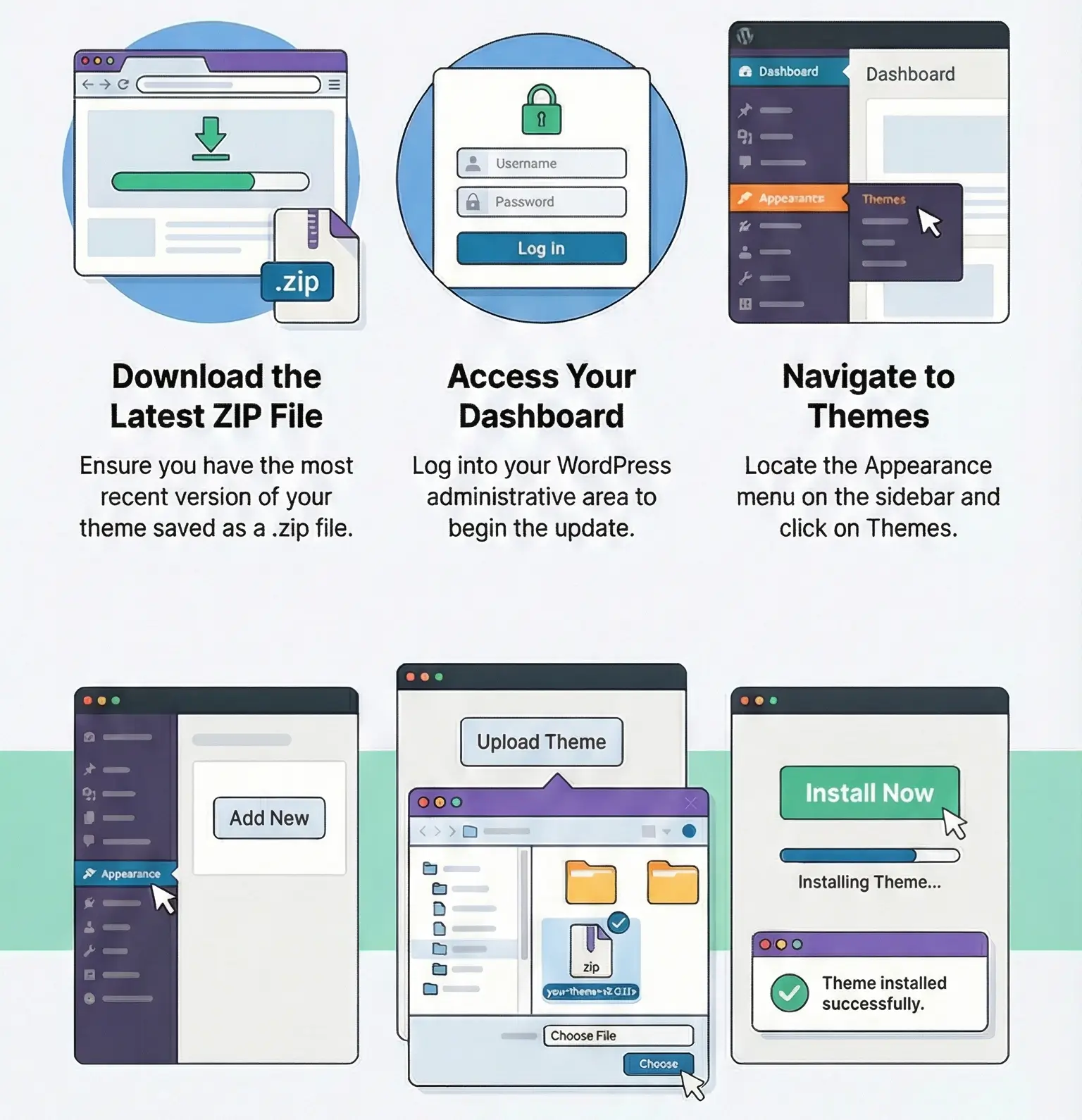
View in VirusTotalGPL behavior is straightforward in practice. The product is activated and fully working, without restrictions — I checked it personally. It runs without a key. What you usually lose without official license linkage is auto-updates, vendor support, and sometimes one-click demo services or cloud library access, depending on how the author tied remote validation. Manual update path is standard: upload the new ZIP in Appearance → Themes or replace the parent theme via FTP. If you edited the parent directly and skipped a backup, the update overwrites those files, so use a child theme and keep a backup.
Yes. The theme runs нормально without a key. The usual loss is auto-updates/support, not core storefront functionality.
Because cache plugins delay Woo JS too aggressively. Exclude wc-add-to-cart-variation, avoid delaying jquery-core, clear all cache layers, then retest in Console.
Mostly yes through the theme panel/Customizer. Deep structural changes still require a child theme, hooks, or template overrides.
Replace only the parent theme ZIP or via FTP, keep custom code in a child theme, and make a backup before update so rollback is quick.
You can use any product from our store on as many websites as you like.
After purchasing a product, you’ll be able to download it — including the most recent version — for the next 72 hours. Once that period ends, you can either repurchase the product or switch to one of our membership plans.
With an active membership, updates are always included. You’ll have continuous access to the latest versions for as long as your membership remains active, without worrying about expiration dates.
Yes, we do. In most cases, you can expect a reply within 24–72 business hours. For simpler issues, we’re often able to respond much sooner.
You can contact us via live chat or open a support ticket directly from the product page — whichever is more convenient for you.
No, there are no limits. We don’t believe in restricting downloads. If you need to download a product multiple times, that’s absolutely fine.
We use professional, high‑performance storage systems to ensure downloads are fast, stable, and hassle‑free.
No, license keys are not included. In the past, license sharing and related issues caused account problems, so we decided to stop distributing keys.
That said, all products you receive are fully authentic. For items that normally require activation, we provide them pre‑activated, allowing you to install and use them immediately without dealing with license input or activation errors.
Yes — 100%. All products are original and distributed under the GNU GPL v2/v3 license.
The main difference compared to purchasing directly from the original author is that we don’t offer additional services such as custom development or one‑on‑one support. License keys are also not included. Instead, products that typically require activation are delivered ready to use, allowing installation on unlimited websites.
Yes, we stand behind our products. If you encounter an issue that cannot be resolved or a technical problem without a workable solution, we’ll do our best to help — and if necessary, issue a full refund.
Please note that refunds are not available if the product works as described but simply does not meet personal expectations. We’ve also encountered cases where refund requests were made while the product was still in use, which we cannot allow.
Our approach is simple: fairness and transparency. If you ever have a concern, just reach out — we’re always open to finding a reasonable solution that works for both sides.




Reviews
There are no reviews yet.