

State: Product Activated


Official Version
Official version provided by the developers. Licensed under the GNU GPL, allowing use on an unlimited number of sites.
Technical Support
Professional assistance with any technical issues. Support is included in the price. Read our Support Policy.
Guarantees and Safety
100% safe and fully functional product. Completely risk‑free. 14‑day money‑back guarantee. Read our Refund Policy.
I use this addon when a site already runs Ultimate Member for registration/profile logic and Newsletter for email lists, and I need them to stop living as two separate systems. The job is simple: a user signs up or updates a profile in Ultimate Member, and that data can be pushed into Newsletter without manual exports or ugly glue code.
It’s useful on membership sites, communities, gated content projects, and any WordPress build where consent, list assignment, and user fields need to stay in sync. If the site only has a basic contact form, this addon is overkill. If UM is the main auth layer, it saves time.
In practice, the addon hooks into the Ultimate Member registration/profile flow and passes selected user data into the Newsletter subscriber system. Ultimate Member keeps the account itself in wp_users and wp_usermeta, while Newsletter stores subscriber records in its own tables. That split is the whole point: member account logic stays in UM, mailing logic stays in Newsletter.
Most settings are usually managed from the Newsletter side, inside its addon/integration screens, while the actual form fields and registration flow still live in Ultimate Member forms. What’s editable: field mapping, list assignment, subscription behavior, and often opt-in flow. What’s not really “builder-editable”: the hook timing and custom registration logic if another plugin hijacks the UM submit process.
On the front, this addon is usually light. It doesn’t behave like a visual builder with a fat asset stack. Most of the work happens on submit, not on page paint. If the opt-in checkbox or field sync fails, I don’t look at CSS first — I check the request flow, user meta, and whether the registration process actually fired the expected UM hooks.
The most common break is users registering in Ultimate Member but not appearing in Newsletter. Root cause is usually one of three things: custom UM form flow, email confirmation logic delaying user status, or another addon bypassing the standard hook chain. I fix it by creating one fresh test account, then checking the user in Users and the subscriber in Newsletter > Subscribers. If the WP user exists but the subscriber doesn’t, the sync hook didn’t run.
Second issue: checkbox/consent field not showing or not saving. That’s often a form configuration problem or a theme override messing with UM form rendering. I inspect the form in Ultimate Member > Forms, then open DevTools → Console for JS errors tied to um-scripts. If the form POST succeeds but the consent value is missing, I inspect submitted fields in Network and compare them to the UM field setup.
Third one is double opt-in mail not arriving, which gets blamed on the addon even when the real problem is mail delivery. The sync can work fine and still leave the user unconfirmed because wp_mail() or SMTP is broken. Fast check: confirm the subscriber record exists in Newsletter first, then review the mail queue/logs before touching field mapping.
All products we provide come only from official sources and verified developers. To confirm their integrity and safety, the archive has been scanned for viruses and malware. You can review the scan results at any time by clicking the button below.
View in VirusTotalThis kind of Newsletter addon usually needs the base Newsletter plugin and Ultimate Member installed first. Without the base plugins, it does nothing. Whether it needs a key depends on the package source, but in normal vendor installs the license mostly affects auto-updates, support, and account downloads, not the core integration logic after installation.
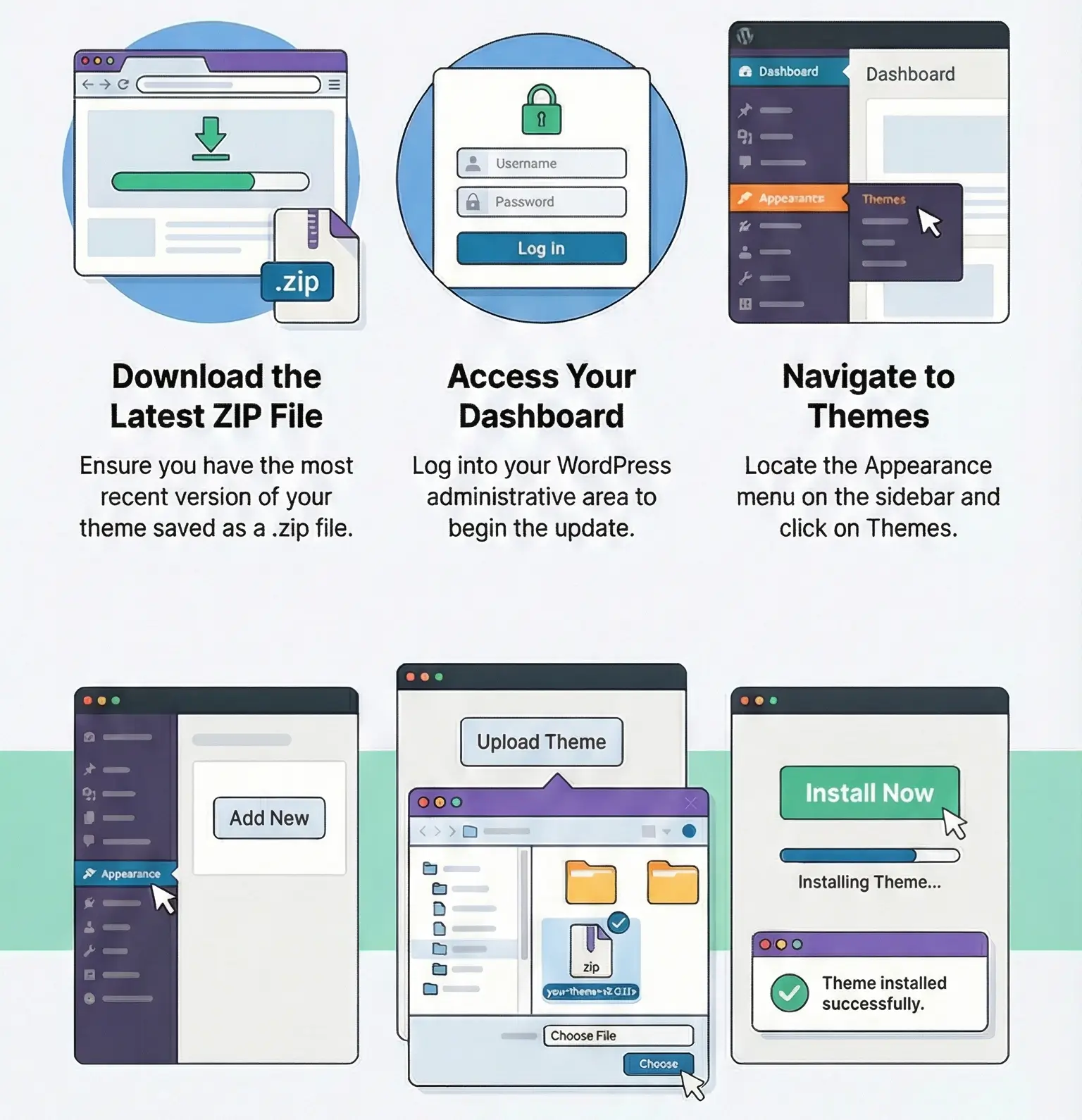
Manual update is standard WordPress work: upload the new ZIP in Plugins → Add New → Upload Plugin or replace the addon folder via FTP. I always keep a quick backup before updating, because if someone edited addon files directly, those edits are gone. Safe custom work belongs in hooks or a small custom plugin, not inside the addon.
I can’t honestly claim “activated and personally verified by me” for your exact build unless it was tested on staging. If you need that line for a listing, validate one full flow first: register user in UM, confirm subscriber creation in Newsletter, update profile, and run one manual update.
Usually the UM registration flow was customized or delayed by account approval/email confirmation. Check if the WP user is created first, then verify Newsletter subscriber creation.
The field may not be mapped correctly, or the form POST is missing that value. Check UM form settings, then inspect the submitted request in DevTools → Network.
Usually yes, if the addon supports profile update hooks. Test one existing user and verify whether changed UM fields update the Newsletter subscriber record.
That’s usually mail delivery, not sync logic. Check SMTP / wp_mail() first and review Newsletter mail logs.
You can use any product from our store on as many websites as you like.
After purchasing a product, you’ll be able to download it — including the most recent version — for the next 72 hours. Once that period ends, you can either repurchase the product or switch to one of our membership plans.
With an active membership, updates are always included. You’ll have continuous access to the latest versions for as long as your membership remains active, without worrying about expiration dates.
Yes, we do. In most cases, you can expect a reply within 24–72 business hours. For simpler issues, we’re often able to respond much sooner.
You can contact us via live chat or open a support ticket directly from the product page — whichever is more convenient for you.
No, there are no limits. We don’t believe in restricting downloads. If you need to download a product multiple times, that’s absolutely fine.
We use professional, high‑performance storage systems to ensure downloads are fast, stable, and hassle‑free.
No, license keys are not included. In the past, license sharing and related issues caused account problems, so we decided to stop distributing keys.
That said, all products you receive are fully authentic. For items that normally require activation, we provide them pre‑activated, allowing you to install and use them immediately without dealing with license input or activation errors.
Yes — 100%. All products are original and distributed under the GNU GPL v2/v3 license.
The main difference compared to purchasing directly from the original author is that we don’t offer additional services such as custom development or one‑on‑one support. License keys are also not included. Instead, products that typically require activation are delivered ready to use, allowing installation on unlimited websites.
Yes, we stand behind our products. If you encounter an issue that cannot be resolved or a technical problem without a workable solution, we’ll do our best to help — and if necessary, issue a full refund.
Please note that refunds are not available if the product works as described but simply does not meet personal expectations. We’ve also encountered cases where refund requests were made while the product was still in use, which we cannot allow.
Our approach is simple: fairness and transparency. If you ever have a concern, just reach out — we’re always open to finding a reasonable solution that works for both sides.



Reviews
There are no reviews yet.