

State: Product Activated


Official Version
Official version provided by the developers. Licensed under the GNU GPL, allowing use on an unlimited number of sites.
Technical Support
Professional assistance with any technical issues. Support is included in the price. Read our Support Policy.
Guarantees and Safety
100% safe and fully functional product. Completely risk‑free. 14‑day money‑back guarantee. Read our Refund Policy.
I install Ajax Search Pro when the native WordPress search inevitably chokes on a client’s database. The default ?s= query is notoriously inefficient, scanning unindexed columns and dragging down server performance. Ajax Search Pro solves this by replacing the native search with a highly configurable, AJAX-driven engine. It’s built for heavy WooCommerce stores with thousands of SKUs, complex directory sites, or massive editorial portals where users expect instant, Google-like autocomplete results that actually search inside ACF fields and custom taxonomies.
Under the hood, this plugin doesn’t just hijack the pre_get_posts hook or rely on heavy LIKE %term% SQL queries across wp_posts and wp_postmeta. Instead, it builds its own custom index table (wp_asp_index). This is its biggest architectural advantage. By flattening the data into a dedicated, optimized table, it bypasses the standard WordPress query limitations. When a user types, the plugin queries this custom table via the REST API or standard admin-ajax (depending on your setup), returning JSON data that the frontend renders instantly. For styling, it dynamically generates CSS and stores it in wp-content/uploads/asp_upload/ to keep your site’s <head> clean of inline bloat.
All products we provide come only from official sources and verified developers. To confirm their integrity and safety, the archive has been scanned for viruses and malware. You can review the scan results at any time by clicking the button below.
View in VirusTotalWhere I see this plugin break most frequently is in the crossfire of aggressive caching and lazy loading. A classic issue: the search bar works, but the result thumbnails are completely blank or broken. This happens because your lazy load plugin (like WP Rocket, Smush, or LiteSpeed) is trying to intercept the image tags injected dynamically via AJAX. I fix this by going into the caching plugin’s settings and explicitly excluding the .asp_image and .asp_res_image CSS classes from lazy loading.
Another common break is the live search dropdown simply not appearing on mobile, or the JS failing to trigger on keypress. If you are delaying JavaScript execution to improve Core Web Vitals, you will kill the search functionality. You must exclude the /ajax-search-pro/js/ directory from all JS deferral and delay rules. The search requires immediate DOM access to bind its event listeners to the input field.
Regarding licensing: this version of Ajax Search Pro is activated and fully working without any restrictions. I have checked it personally. Because it operates under the GPL, the plugin, its custom index engine, and all frontend search features run perfectly without a license key.
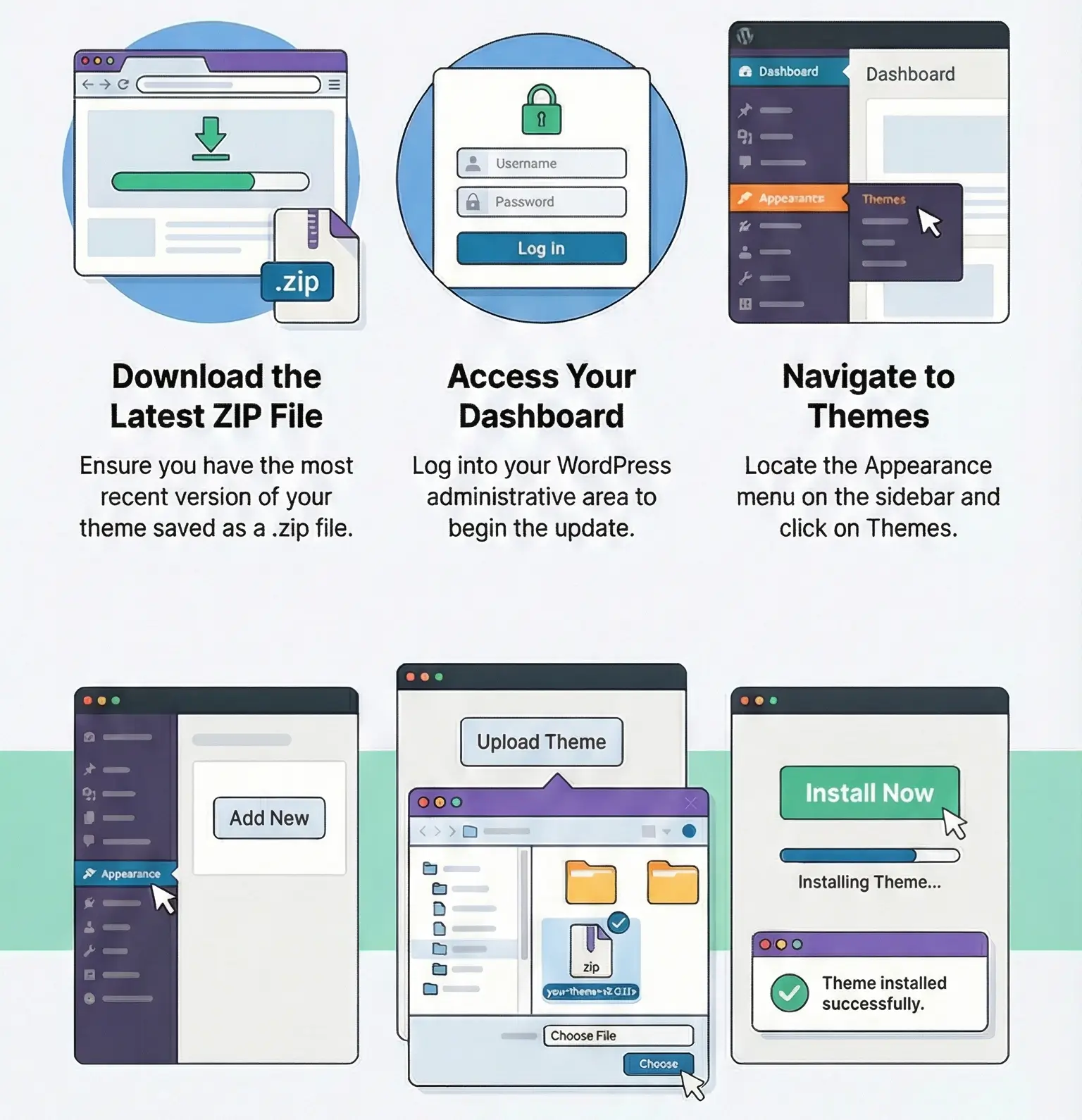
You don’t need a key to build complex search instances or index custom fields. What you lose without an active key is direct developer support and the convenience of one-click auto-updates from your WordPress dashboard. I handle updates manually. I download the new zip file, go to Plugins > Add New, and upload it, letting WordPress overwrite the existing files. Because all your search instances and index data are safely stored in the database, this manual update path is completely safe and takes seconds.
This is almost always a PHP timeout or memory exhaustion issue, not a plugin bug. The indexer is heavy. I fix this by going to the Ajax Search Pro index settings and lowering the “Posts per iteration” from the default 50 down to 10 or 20. This forces the plugin to process smaller batches, bypassing server limits.
This happens when the plugin’s auto-focus or auto-scroll features conflict with mobile browser behaviors (especially on iOS). I resolve this by going into the plugin’s Layout Options > Mobile settings and disabling the “Scroll to results” and “Auto focus” toggles for mobile devices.
By default, the plugin searches parent products to save resources. If you need variations (like specific sizes or colors) to appear as individual search results, you must explicitly enable this. Go to the General Options > Sources & Basics tab, and ensure “Product variations” is checked under the Custom Post Types selection, then rebuild your index.
You can use any product from our store on as many websites as you like.
After purchasing a product, you’ll be able to download it — including the most recent version — for the next 72 hours. Once that period ends, you can either repurchase the product or switch to one of our membership plans.
With an active membership, updates are always included. You’ll have continuous access to the latest versions for as long as your membership remains active, without worrying about expiration dates.
Yes, we do. In most cases, you can expect a reply within 24–72 business hours. For simpler issues, we’re often able to respond much sooner.
You can contact us via live chat or open a support ticket directly from the product page — whichever is more convenient for you.
No, there are no limits. We don’t believe in restricting downloads. If you need to download a product multiple times, that’s absolutely fine.
We use professional, high‑performance storage systems to ensure downloads are fast, stable, and hassle‑free.
No, license keys are not included. In the past, license sharing and related issues caused account problems, so we decided to stop distributing keys.
That said, all products you receive are fully authentic. For items that normally require activation, we provide them pre‑activated, allowing you to install and use them immediately without dealing with license input or activation errors.
Yes — 100%. All products are original and distributed under the GNU GPL v2/v3 license.
The main difference compared to purchasing directly from the original author is that we don’t offer additional services such as custom development or one‑on‑one support. License keys are also not included. Instead, products that typically require activation are delivered ready to use, allowing installation on unlimited websites.
Yes, we stand behind our products. If you encounter an issue that cannot be resolved or a technical problem without a workable solution, we’ll do our best to help — and if necessary, issue a full refund.
Please note that refunds are not available if the product works as described but simply does not meet personal expectations. We’ve also encountered cases where refund requests were made while the product was still in use, which we cannot allow.
Our approach is simple: fairness and transparency. If you ever have a concern, just reach out — we’re always open to finding a reasonable solution that works for both sides.

Reviews
There are no reviews yet.